Author Archives: DataPins

How To Rank a Service Area Business (SAB) in Multiple Cities


Business owners trying to figure out how to rank a service area business in multiple cities are often presented with conflicting or unhelpful advice.

Implementing a successful Local SEO strategy is more challenging for businesses that provide services outside their primary location.

These businesses, known as service area businesses or SABs, often serve dozens of smaller cities within a general area.


Google’s local algorithm is not engineered for these types of businesses because the local map pack results are shown based on the searcher’s proximity to the businesses’ verified addresses.

For home service providers like HVAC and pest control, this confines their Google Maps clicks to a small sub-section of the consumers they are trying to reach.

Luckily, with innovative software solutions and website content tweaks, SABs can rank on Google in multiple cities.

Ranking Service Area Business in Multiple Cities (Blog Cover)

Steps to Ranking a Service Area Business in Multiple Cities

Since the early days of SEO, small businesses have consistently faced the problem of ranking for keywords in multiple cities. This is incredibly challenging for service area businesses (SABs), which often serve many areas and communities.

Although their office address (or home office) may be in a small suburb, they can travel 10 minutes to reach consumers in a much larger metro area. But how are these consumers going to find them?


The following steps reveal how to rank an SAB in multiple cities on Google:


1) Create Unique City Pages

Google’s organic algorithm (the traditional ten blue links) is less constraining than its Google Maps counterpart, providing a better opportunity for SABs to rank.

Considering this, service area businesses should publish high-quality city pages that target their service type (e.g., pest control) in specific cities (e.g., Plano, Mesquite, Allen, etc.).

Like any page that Google ranks on its first page, the content must be 100% unique and provide value to the customer based on E-E-A-T principles, which means experience, expertise, authority, and trust.
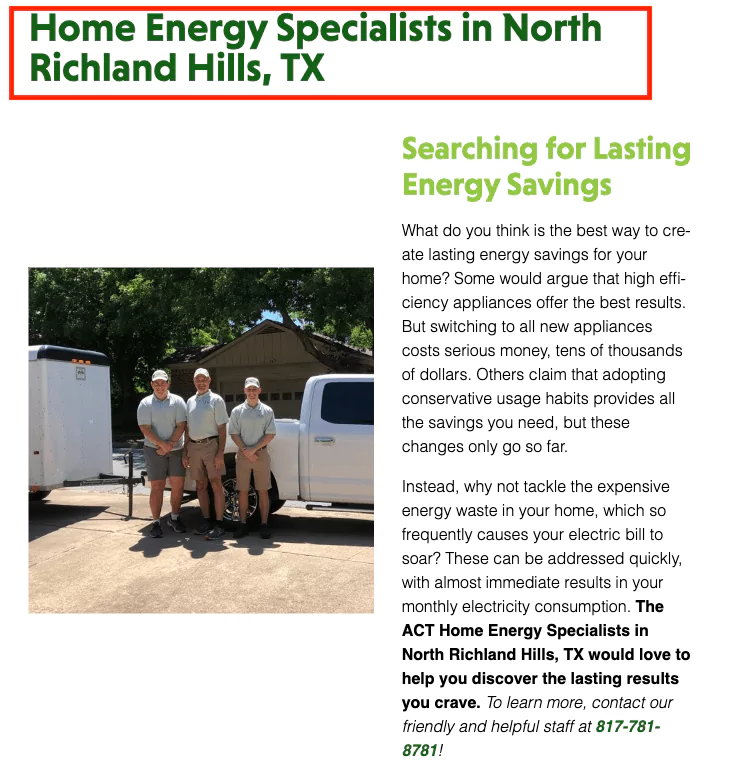

SAB City Page (Screenshot)

2) Utilize DataPins

DataPins is the software we created to include on city pages for service area businesses, such as HVAC and pest control companies.

DataPins generates pins based on recent jobs, consolidating local SEO signals such as geo-coordinates, schema markup, job descriptions, unique photos, and mini-maps.

Pins are a digital hand raise for Google, displaying 100% unique content based on real jobs.


3) Establish a Digital Brand

The final step in this process is more of a long-term investment in building your digital brand.

While you cannot become a household name overnight, regularly accumulating Google reviews, showcasing proof of your work, and publishing E-E-A-T signals on your website can help you achieve this over time.

As your brand gains authority, your city pages and Google Business Profile can rank for a broader range of keyword terms than a run-of-the-mill competitor.


4) Create Separate Websites (for Legitimate Locations)

Suppose your service area business has multiple verified Google Business Profile addresses that are at least 2 hours’ driving distance from one another. In that case, it can be beneficial to create a separate website for each location.

The further away a location is from your primary location, the more beneficial it is to create a new website for that location.

Some SABs even have locations that cross state lines, in which case a separate website with a locally-focused SEO strategy becomes crucial for maximizing rankings in both areas.


Other Considerations for Ranking in Multiple Cities


Google Maps Results Favor Address Proximity

Many local SEO experts have demonstrated that Google Map Pack rankings favor the local listing whenever possible. The location data is based on the verified address of your Google Business Profile.

If you are a roofer whose business listing is set in Plano, TX, you will have trouble showing up for terms like dallas roofer, or roofer near me when the searcher’s device is pinged within a Dallas zip code.


See an example below:
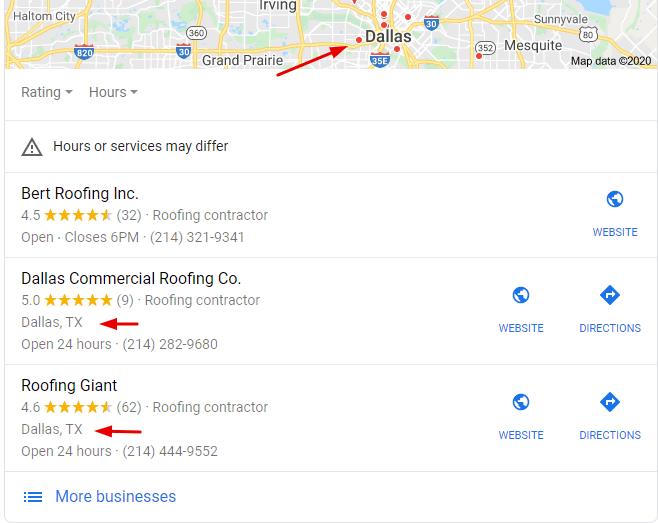

Dallas Roofer Local Search (Screenshot)

Plano roofing companies will have difficulty ranking for queries containing “Dallas.”


Organic Rankings are Based on Other Factors

Generally, local SEO city landing pages will only rank if A) they are endorsed through links from other relevant entities within that community, or B) they have original content (such as user-generated reviews and pins) that validate a business’s credibility within a specific geographic radius.

With DataPins’ technology, reviews and pins are added to location pages (automatically), which allows the page to rank in a city that your business has serviced but is not actually located in. See an example:
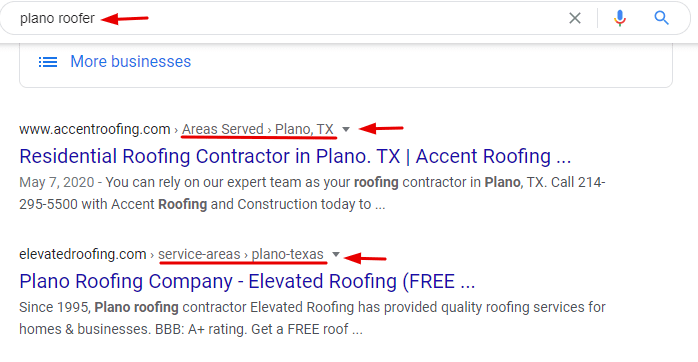

Plano Roofer Organic Search (Screenshot)

It’s easier to rank outside of your address city on traditional organic results (with city pages)


Google Business Profile Service Area Challenges

Google Business Profile is an essential tool for marketing your business. It makes it easier for people who need your services to find you. But what if you are a service area business?

Ranking outside your main zip code is notoriously tricky because Google prioritizes local searches based on which businesses have a physical address within the specified area.

And the further you venture out from your physical address, the more competition there is. You may only have ten competing businesses within your zip code, but that number balloons to dozens the further you go out.


Google is continually striving to enhance its user experience, and location specification plays a significant role in that effort. That’s why it has been so tricky for service area businesses to get ranked in the areas that they serve. 

The following guide examines the challenges related to Google Business Profile service area ranking. We will also discuss some ways you can overcome those challenges and increase your visibility to more people outside the city where your business is physically located.


Google Business Profile Areas Served

Google Business Profile used to have a feature that allowed businesses to set their physical location and then an “areas served” radius that surrounded that centralized location.

It was a nice and convenient feature, to be sure. But people started abusing it. Businesses frequently exaggerated their service area radius to appear in more searches, even though they didn’t really work in those areas.

So naturally, as part of Google’s ceaseless quest to please its users, it struck this feature down.


As many businesses have found out, ranking using the Google Business Profile service area feature isn’t easy. However, as Google shut one big door, they opened a window simultaneously.


Service Area Businesses (SABs)

Service area businesses were thrilled when Google unveiled its new service area features. While it’s not as easy as expanding your area’s served radius on a map, it increases the quality of search results, which, in the end, is better for your business.

A Google Business Profile wizard now helps you specify all of your unique areas served. And while it can be a bit tedious (especially if you operate in many cities), it is very simple.

The Google Business Profile setup process now includes a “Where do you Serve Your Customers” section.


You can list as many areas as you want in this section. The city names you enter will then appear under the Overview section of your Google Business Profile.


Zip Code SEO Rank

Business owners operating in large cities like Los Angeles and Dallas may encounter another challenge with their Google Business Profile service area.

These cities are massive and have multiple zip codes within their specific areas and neighborhoods.

The problem is that these smaller areas are still covered under city names like Los Angeles and Dallas. So, business owners in these areas haven’t been able to let their customers know that they serve their area until recently.


In addition to including city names, Google has made it easier for searchers to find businesses in large metropolitan areas.

You can now enter specific zip codes for areas that may not have their own specific name.


Adding New Service Areas to GMB

Another way Google has made it easier for businesses to manage their Google Business Profile service area is by not locking them into one area after they set up their profiles.

You can go into your Google Business Profile dashboard and change the Storefront Address and Service Area sections as needed.

This is an excellent feature for growing businesses and frequently adding new cities to their service coverage area. 


Projecting Future Google Business Profile Updates

The challenge of ranking outside one’s own zip code is just one in a series of many more. As Google finds ways to improve its service, there will surely be more changes that will frustrate business owners and DIY marketers. 

It’s important to understand these challenges as they arise so that you can find ways to overcome them.

Here at DataPins, we must stay abreast of all such changes in ranking criteria and other marketing trends. Our software was designed specifically to address these service area challenges.


Google Business Profile Address Requirements

Google requires a physical address to verify your Google Business Profile, but it does not have to be visible to the public.

Google sends a verification number to the physical address you provide to verify you as a real business. Your listing will be verified once you confirm this verification number with Google.


Once you verify your address through Google, you can mark your listing as a Service Area Business (SAB), which allows you to hide the verified address from the public.
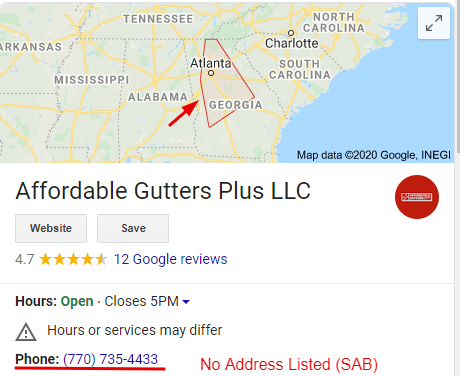

GMB Hidden Address (Screenshot)

You must verify your physical location with Google, but you can then hide it from the public


Using a Home Address for Your Google Business Profile

Home services providers can use their home addresses to verify their Google Business Profile, even if it is not a storefront or official office.

Before you consider not creating a Google Business Profile and focusing only on organic results, please understand that it is critical for service area businesses to have an active GBP.

Your Google Business Profile is where customers leave reviews for your business, and it is what will show up when people search for your brand name on Google.


Hiding your GMB Address

The process of listing your home address on Google Business Profile but keeping it invisible to the public is actually very easy:


  • Navigate to the dashboard of your Google Business Profile
  • In the top right-hand corner, click the button that reads “Manage Now.”
  • Provide the business name information it asks for during the prompts
  • Once you have filled out your business name information, you will be prompted to list an address for your business. 
  • List your home address or the residential address you wish to use
  • Check the “I deliver goods and services to my customers” box
  • Then, check the “Hide my address (it’s not a store) box 
  • Complete the setup process as normal

Now, your business can be verified, and your home address will not be visible to the public.


Service Areas

Now that you know how to set up your Google Business Profile listing without using a business address, it’s time to list the areas you serve.

Listing service areas on GBP is absolutely crucial for service area businesses.

When people click on your Google Business Profile, they will see whether or not you operate in their area under the overview section.


97% of people will use online resources like Google Business Profile to research local businesses. 

You simply cannot afford to omit this step. Luckily, the process is pretty easy, if not a bit tedious.

Google My Business now allows you to enter as many locations as you want when setting up your listing. In the setup wizard, you will see a section titled “Where do you serve your customers?”


In the field they provide, you can type in the names of the cities that you service. If you want/have to be really specific, you can also enter zip codes.


Using DataPins to Rank in Multiple Cities

The DataPins software is designed to help SABs rank in multiple cities throughout their service areas. Hundreds of businesses are already using this tool on their websites.

To expand your ranking radius, you should create unique city pages, implement DataPins, and build a long-term digital brand. The software helps you achieve all three of these goals.

Google and its users really want the same thing: to be presented with helpful content that meets their search intent.


When a homeowner in Plano, TX, requires a pest control service, they seek the most qualified company rather than the closest office (since the provider will have to come to them).

While the Google Maps algorithm will continue prioritizing businesses with nearby addresses, the organic rankings will showcase websites and city pages that best meet users’ specific needs.

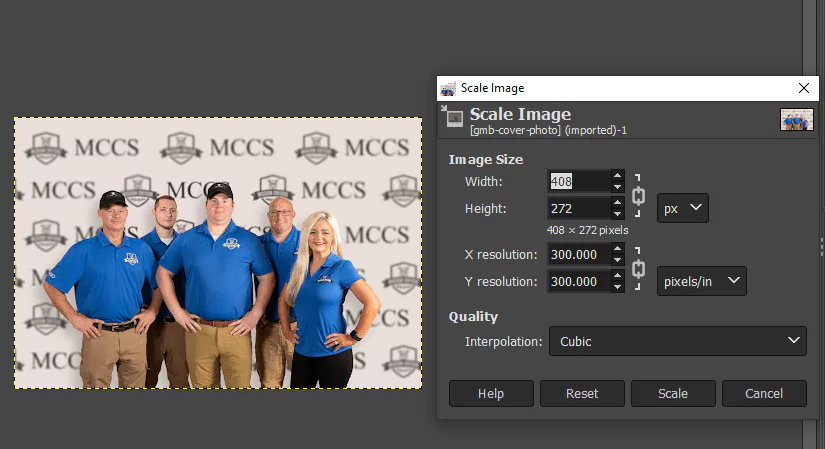
How to Optimize Your Google My Business Cover Photo


The following post outlines how to optimize your Google My Business cover photo. Remember that Google My Business is now called Google Business Profile, but the same steps apply.

Most local businesses understand the importance of an optimized Google Business Profile listing and want to take every step to enhance their profile. A strong cover photo can help achieve this.


Key Takeaway

The ideal image size for your GBP cover photo is 1024 x 576.


Google My Business Cover Photo

Why are Google Business Cover Photos Important?

The quality, size, and message that your Google Business Profile cover photo sends will impact how many people click on your business profile. Google Business Profile listings appear on the local map pack.

The map pack is typically the top result people see when searching for a local business, product, or service.

You want to make a good impression as your Google Business Profile cover photo is likely the first interaction a new (or potential) customer will have with your business. 


Steps to Optimize Your GBP Cover Photo

Your GBP listing is hugely important to your search engine rankings because Google will prioritize its own services as often as possible. 

As a result, a Google Maps listing will appear on the first page of a Search Engine Result Page(s) (SERP).

The Google Map Pack is the most frequently indexed SERP feature, appearing on the first page when users search for a local-intent query. Furthermore, Map-Packs appear above regular organic listings.


Below, we outline ways to optimize your Google My Business cover photo.


Image Dimensions

First, you must have a good image size for your photo. It used to be that Google would require a 16:9 aspect ratio image for your Google Business Profile cover photo.

While that is not the case anymore, and they offer more leeway, they implemented that requirement for a reason: it’s a good size aspect ratio for the sizes of images displayed on GBP listings. 


Key Takeaway

The ideal image size for your GBP cover photo is 1024 x 576.


While you can upload other sizes like 854 x 480, 1024 x 576 is good because it’s small enough not to slow down your listing loading time but not too small to be a poor resolution. 

Remember that the searcher will see only a small image when your listing comes up, so choose a good one while remembering that they can see more photos if they click through.

While you will probably need to play around with the dimensions of your picture to land on the perfect size, here are a few things to keep in mind:


  • Load Time Affects Rankings: You never want your image to slow down your listing’s loading time. Remember that Google recommends a load time of 2 seconds or faster, so make sure your picture is not so big that it loads slowly.
  • Quality Matters: You should always have an HD image as your Google My Business cover photo. Poor quality, blurry, fuzzy, or off-center images speak of unprofessionalism or carelessness. 
  • Storefront Images: If you have a storefront business, making your storefront your cover photo may be helpful, as it will quickly let people know what your storefront looks like if they are physically searching for it. 

File Format

Google also gives you a choice of which format or file type of image to upload. For example, you can choose between PNG or JPG.


Here is a brief breakdown of the pros and cons of both:


  • PNG: PNG images tend to be in higher resolution, but their file sizes are larger. The bigger size makes them look good but can cause them to load slowly. 
  • JPG: JPG images can be compressed, so the file sizes tend to be smaller and load quicker. 

The quality of a JPG can be compromised by compression. However, by and large, they still offer an adequate resolution for a Google Business Profile cover photo, so our overall recommendation would be JPG. 


File Size

You will need to stay within the file size parameters of 10kb and 5MB, but this shouldn’t be too much of a problem if you stay within the 480 x 270 and 2120 x 1192 resolution range.

Google will notify you if your file exceeds its size limit and prompt you to choose a different cover photo or temporarily leave it blank. In addition, you can use image-editing software like GIMP to reduce file sizes.


Image Guidelines

Also, you should ensure that your Google Business Profile cover photo is devoid of filters that drastically alter the appearance of your image.

Google doesn’t like business owners misrepresenting their stores, products, or services with doctored photos. 

Of course, it can be tricky to know how much photo alteration is too much, but as a general rule of thumb, you should stick to only tweaking saturation levels and brightness. 


If you go overboard with the doctoring or upload an image that doesn’t comply with Google’s requirements, they may replace your image with their own selection.

By using DataPins, you can consistently upload new, unique photos to your GBP listing.


Next Steps for GMB Optimization

Attending to all aspects of your Google Business Profile is integral to the Local SEO Process. This includes optimizing your Google My Business cover photo.

However, no single task can fully optimize your Local SEO presence. Instead, the combination of multiple optimization efforts will separate you from your nearby competitors.

Check out our YouTube channel to learn more about how DataPins can help optimize your business profile.


Field360 Users Move to DataPins


Field360.ai users have been transitioned to the innovative DataPins Local SEO platform, as we deliver premium functionality to our users.


DataPins Logo (Alternate)

Explore Our Local SEO Services

  • DataPins Local SEO: Our flagship Local SEO software for pins, check-ins, and digital branded signaling.
  • Map Pack SEO: Advanced strategies to help your business appear in Google’s coveted Map Pack.
  • SEO for Multiple Cities: Tailored solutions for businesses looking to optimize their online presence across multiple locations.
  • Multi-Location Website Design: We offer custom website design services for businesses with multiple locations, ensuring a consistent and effective online presence.

DataPins continues to set the pace for the future of local SEO for contractors throughout the United States.


Study: Zip Codes in SEO Titles Have Limited Impact


As the founder of DataPins – a Local SEO software designed to boost rankings in specific cities, towns, and zip codes- I’ve tested every Local SEO tactic in the book, including inserting zip codes into SEO titles.

Zip codes in SEO titles were used relatively often, starting around 2013 and gradually becoming less common.

However, the tactic is still used occasionally, especially by contractors who work in expanded service areas.


Zip Code SEO Title (Blog Cover)

What The Data Says About Using Zip Codes in SEO Titles

At DataPins, we took five popular industries (plumbing, roofing, painting, pest control, and electrical) along with ten of the most popular zip codes in the United States to test the impact of this tactic on SEO success.


Zip Codes in SEO Title (Data Chart)

Keyword Volume

We first measured the estimated search volume of keywords, including zip codes, to see if these terms were worth targeting from a traditional SEO standpoint.

Here are the results:


Zip CodePlumberRooferPainterPest ControlElectrician
7993602000
9001100000
6062910000
9065008010
9020101000
77084232701300
9233500000
78521000024
7744910030
7857200000

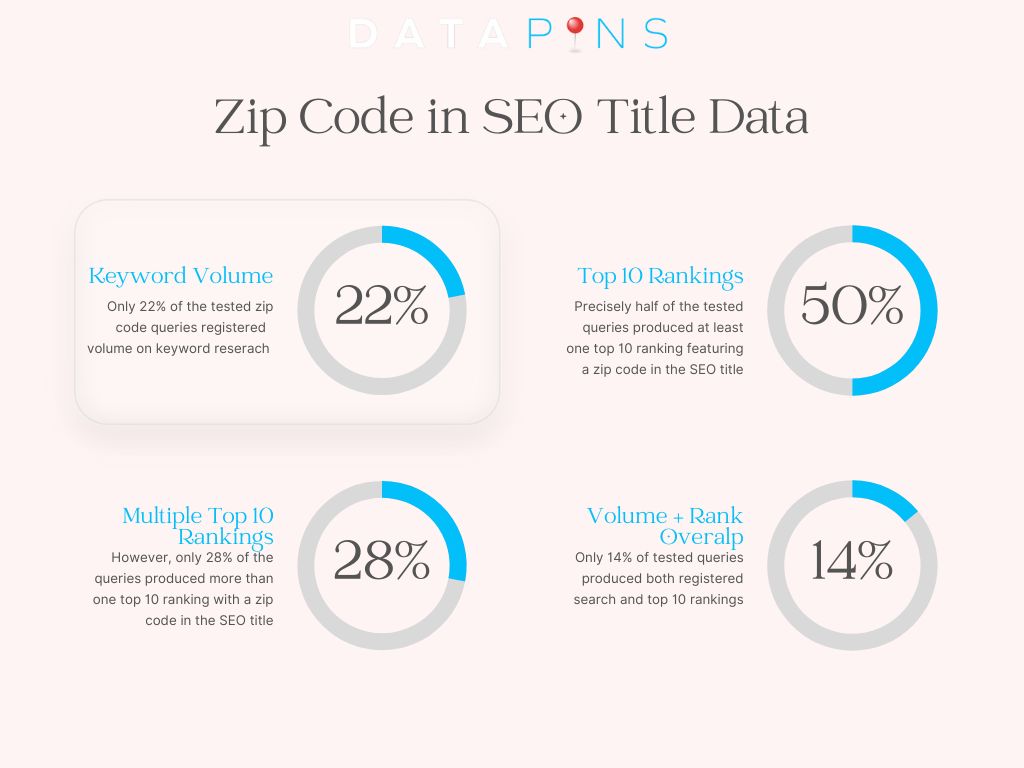
Out of 50 tested keywords, 11 registered search volumes. Of the 11 with search volume, only five had a search volume above 3.

What this tells us is that users searching for zip code queries is a rare occurrence but does happen from time to time.

At DataPins, we also understand that search volume is an imperfect metric as it is estimated and does not account for nearly 50% of “hidden queries” on Google Search Console.

However, DataPins’ internal data confirms that zip code queries are relatively rare, even in those “hidden terms.”


Keyword Rankings

It’s one thing for users to include zip codes within their search queries, but how Google interprets those queries is another matter.

We know that Google uses Natural Language Processing (NLP) to understand the intent of keywords. As a result, Google may interpret a zip code as the equivalent of a city name since that’s what the user intends to find.

We tested this by measuring the amount of top-10 rankings for these queries that include the zip code within their SEO title.

Here’s what the data says:


QueryTop 10 Rankings with Zip Code in SEO Title
plumber 799360
plumber 900110
plumber 6062910
plumber 906501
plumber 902013
plumber 770841
plumber 923350
plumber 785211
plumber 774490
plumber 785720
roofing 799360
roofing 900110
roofing 606291
roofing 906501
roofing 902017
roofing 770841
roofing 923350
roofing 785210
roofing 774491
roofing 785721
painter 799360
painter 900110
painter 606295
painter 906504
painter 902017
painter 770840
painter 923353
painter 785210
painter 774490
painter 785722
pest control 799360
pest control 900110
pest control 606293
pest control 906501
pest control 902013
pest control 770841
pest control 923350
pest control 785210
pest control 774490
pest control 785720
electrician 799360
electrician 900111
electrician 606295
electrician 906502
electrician 902015
electrician 770840
electrician 923352
electrician 785210
electrician 774490
electrician 785720

Of the 50 test queries, precisely half (25) featured at least one top-10 ranking with a zip code in the title tag. Of those 25 queries, 14 featured more than one ranking with the corresponding zip code.

Yelp results accounted for many of the rankings, leading to inconclusive analysis because of the platform’s premium domain authority, which allows it to rank despite zip code insertions rather than because of them.


Volume and Ranking Correlation

Next, we looked at the correlation between top-10 rankings and search volume for each query.

Here’s what the data says:


QueryVolumeTop 10 Rankings with Zip Code in SEO Title
plumber 7993600
plumber 9001100
plumber 60629110
plumber 9065001
plumber 9020103
plumber 77084231
plumber 9233500
plumber 7852101
plumber 7744910
plumber 7857200
roofing 7993620
roofing 9001100
roofing 6062901
roofing 9065081
roofing 9020117
roofing 77084271
roofing 9233500
roofing 7852100
roofing 7744901
roofing 7857201
painter 7993600
painter 9001100
painter 6062905
painter 9065004
painter 9020107
painter 7708400
painter 9233503
painter 7852100
painter 7744900
painter 7857202
pest control 7993600
pest control 9001100
pest control 6062903
pest control 9065011
pest control 9020103
pest control 770841301
pest control 9233500
pest control 7852100
pest control 7744930
pest control 7857200
electrician 7993600
electrician 9001101
electrician 6062905
electrician 9065002
electrician 9020105
electrician 7708400
electrician 9233502
electrician 78521240
electrician 7744900
electrician 7857200

No clear correlation emerged within the data regarding a zip code’s search volume and top 10 rankings. 

For example, the highest volume query, “pest control 77084,” only produced one top-10 ranking with the zip code in the title tag, while the one search volume, “plumber 60629,” had the most top-10 rankings (10).

Multiple queries with zero registered search volume had numerous top-10 rankings. Conversely, several queries with registered search volume lacked any top-10 rankings.


Other Considerations

Google is a powerful machine with complicated AI-driven algorithms that are much more intelligent than any human test. As a result, each query is unique in Google’s ecosystem, meaning there is no one-size-fits-all answer to an open-ended question. 

With this in mind, it’s essential to consider other factors that influence the impact of zip codes on an SEO title tag.


User Intent

Despite a lack of correlation between registered search volume and top rankings, user intent is a factor in all search queries. This is true not only of zip codes but also of county names, township names, and other local identifiers that may be unique to a region or location.

That’s why contractors looking to succeed with Local SEO should learn the nuances of their service area, the clientele, the culture, and the dialect. Reflecting this knowledge within your web content is the best way to demonstrate a unique local expertise.


Spam and Algorithmic Violation

The greatest potential danger of implementing a wide-ranging zip code SEO strategy is producing spam content and violating Google’s Helpful Content Update algorithm.

Mass-producing location pages for every zip code in your service area violates Google’s Helpful Content guidance, as these pages are produced exclusively for search engines rather than offering unique value to users.

Because cities can have multiple zip codes, producing pages on a zip code basis creates more unhelpful content, increasing the likelihood of your content being filtered as spam.


SEO-Friendly Alternatives

Aside from the negligible benefits of inserting zip codes in a title tag, there are better alternatives for Local SEO. One example is DataPins, which populates location identifiers, including schema markup and geo-coordinates to your site’s most relevant pages.

These local signals come from your real-life jobs, demonstrating social proof of your company’s work in the field. DataPins adds local relevance to existing pages, so they continue gaining unique content based on your performance.


Final Verdict

Like most things in SEO, the answer is “it depends.” However, using zip codes within the SEO title is not a viable strategy at scale. In some cases, zip code insertions in the title can benefit rankings, but they are anecdotal circumstances requiring granular analysis and execution.

The dangers of using a large-scale zip code insertion strategy are clear, as this tactic violates Google’s guidelines and dilutes the value of your site’s content. A better alternative is using DataPins to populate valid location signals onto your pages, using schema markup and geo-coordinates.


8 Revealing Florida Local SEO Statistics


It’s no secret that Florida businesses can benefit from search engine optimization.

However, a hyper-local focus on specific cities and regions within Florida is what sets good marketing campaigns apart from great ones.

At DataPins, we don’t expect you to take our word for it, which is why we’ll provide insightful data on the power of Local SEO for Florida-based businesses.


DataPins Logo (Alternate)

Key Florida Local SEO Statistics

  • 78% of local searches lead to purchases
  • 22% of zip code queries register search volume
  • AI Overviews are appearing for 68% of local queries
  • Over 50% of “Near Me” Searchers Visit the Location
  • 62% of consumers disregard businesses with no online presence
  • 84% of consumers trust online reviews as much as personal recommendations
  • 86% of consumers report using Google Maps to find local businesses
  • 46% of all Google searches include location

Google implemented the Pigeon update in 2014. Over the past ten years, how search engine optimization tactics work has shifted.

The update allows local businesses to reach more consumers in their immediate area. However, small companies have been slow to take advantage of it.


Business owners should reference these local SEO statistics in Florida when allocating their marketing budget.

This post aims to impress Florida business owners with the importance of local SEO and how it can benefit your bottom line. 


1) 78% of local searches lead to purchases

According to at least one study, 78% of local searches— those in which the user specifies a geographic location —lead to purchases.

Likewise, people who use their computers or mobile devices to search for a service or business near them will purchase from that business 78% of the time. 

Local searches commonly have purchasing intent, which is why local SEO is so powerful.

You are essentially putting your business in front of pre-qualified leads ready to purchase. All you have to do is be available to them. 


2) Only 22% of zip code queries register search volume

Marketing agencies have long been testing and promoting various Local SEO theories to attract new clients. One long-standing claim is that inserting zip codes within an SEO title increases its performance.

Unfortunately, a study found that only 22% of zip code + service queries register any search volume in keyword research tools.

While this doesn’t tell the whole story, since over half of all search queries come from hidden terms, it raises doubts about the impact of zip codes in SEO titles.

While zip codes are more of a spam-like technique, using branded digital signaling, such as geo-coordinates from your recent Florida-based jobs, is a great way to increase the local relevance of your web pages.


3) AI Overviews are Appearing for 68% of Local Queries

When Google introduced AI Overviews into its search engine results pages, some predicted these would only appear for national terms.

However, that his proven not to be the case with AI Overviews now appearing for 68% of local queries.

Florida-based businesses should now optimize their websites to secure mentions within these AI Overviews, as these will drive more customers to your business in non-traditional ways.

For example, a user may choose your company based on an AI-generated answer from Google despite never being tracked as an organic visit via Google Search Console.


4) Over 50% of “Near Me” Searchers Visit the Location

It’s great to have your business visible online. But what percent of people who see your business on a local search will come in and visit your physical location?

Well, according to Florida local SEO statistics, more than 50%. So, over half of the people who find your business through a local search will visit your brick-and-mortar location. 

Getting people’s foot in the door is essential for most businesses. This statistic shows that local SEO can help. 


5) 62% of consumers disregard businesses with no online presence

What can happen if you don’t have an online presence or don’t optimize your site for local searches?

According to one survey, 62% of consumers won’t even give a business a chance if they can’t find information online. 

The fact of the matter is that the internet is how people conduct consumer research. Suppose a consumer can’t get the answers to their questions about your business by looking it up online.

In that case, they will likely purchase from one of your local competitors. 

Essentially, if you don’t optimize your site for local searches, you won’t be visible to local consumers. 


6) 84% of consumers trust online reviews as much as personal recommendations

Part of optimizing for local searches is getting reviews for your business.

Here at Datapins, we provide an accessible software suite that helps you get more reviews and leverage your existing reviews to get more leads.

The main point is that 84% of consumers trust online reviews as much as in-person references. 

More than that, most consumers need to read at least one online review before making a purchase decision.

Online reviews are an essential part of your off-site optimization, meaning there are ways to get more web traffic outside your website. Getting reviews and managing them will generate more leads. 


7) 86% of consumers report using Google Maps to find local businesses

Have you ever opened the Google Maps app and typed in a category, such as restaurants, malls, or gas stations? We’ll assume you answered “yes” to that question.

We’re confident in that assumption because 86% of consumers use Google Maps to find local businesses. 

When you search for anything in Google Maps, it will show you the closest matching results. And with so many consumers using the app to perform these kinds of searches, it’s clear to see how important local SEO is.

For business owners, it’s a valuable tool that allows you to gain more leads through a service that people already use. 


8) 46% of all Google searches include location

Google is a top global resource for information ranging from news to entertainment. However, despite its wide-ranging coverage, nearly half of all Google searches contain location information.

As a result, the number of local searches that occur on Google is revealing for Florida businesses.

When Florida consumers need services from a roofing company or HVAC contractor, they primarily go to Google to find them.

Whether it’s the Local Map 3-Pack or traditional organic results, the companies ranking in these spots will generate the most business.


How To Use These Local SEO Statistics

The statistics outlined in this post reveal how Local SEO is one of the best investments a business owner can make.

Whether operating from a large city like Orlando or a smaller town like Altamonte Springs, Local SEO for Floridians can be a game-changer for your small business.


Check out DataPins: The Map-Ranking App to automate your Florida Local SEO strategy.


GPS Photo Tags for GMB vs. Schema Pins (Myth vs. Reality)


Many SEO experts have examined the myth that GPS photo tags influence Google Maps rankings. Extensive tests and research have repeatedly shown that geotagging photos has zero impact on search results.

Google strips the EXIF data from the image as soon as it’s uploaded, so any location data added to the image file is immediately erased.

However, don’t confuse GPS photo tags with other SEO techniques, such as schema markup and geo-signaling, which can, in fact, influence rankings.


Local businesses tend to misunderstand the distinction between tagging an image file’s EXIF data and inserting a schema markup property called geo into a schema markup type called place onto a website.

The confusion is understandable, especially for business owners lacking SEO and digital marketing expertise. However, people must educate themselves on the subject to avoid misinformation.


GPS Photo Tags Google My Business (Blog Cover)

What is Image Geo-Tagging?

Geo-tagging, also known as GPS photo tags, involves inserting location information into an image’s file data. The actual tags are the photo’s location information. 

For instance, one might geotag a photo by inputting latitude, longitude, and altitude information into the EXIF data of a given image.

The user might then upload the geotagged photo to their Google Business Profile, hoping to provide Google with more information about the picture’s location.


People must understand that geotagging images does not influence rankings and is a complete waste of time.


SEO Alternatives To Geo-Tagging

While geotags do not directly impact SEO, there are alternative techniques that have been proven to influence local search rankings when implemented effectively.

For example, schema markup for location-specific information can influence rankings when combined with on-page SEO fundamentals.

Local SEO tools, such as DataPins, automate this process by applying schema markup to “pins” on your website.


As a result, each completed job is converted into consolidated local SEO signals that include various types of schema markup, along with image- and text-based location context.


Schema Pins

Schema pins are pieces of unique map data, in schema form, generated by the DataPins app.

Just like with GPS photo tags, the basic principle is to create unique, location-oriented content for your website—or, as today’s post emphasizes, your Google My Business page.

The difference is that Schema Pins influence rankings. 


With the DataPins app, you can take a picture of the worksite, enter the location information, and have unique image and map content published to the relevant sections of your Google My Business page.

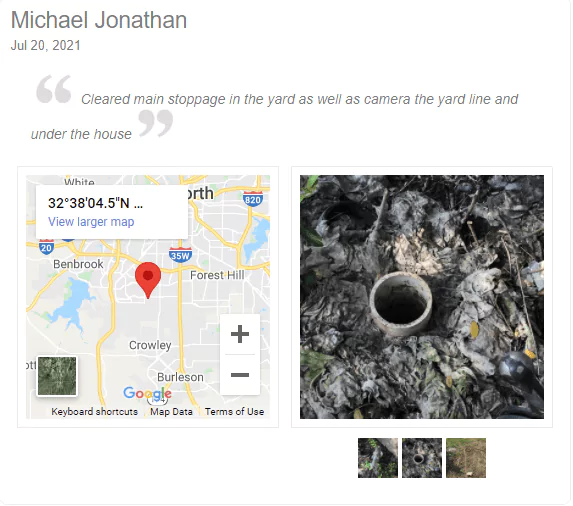
Schema pins display the service’s location on the map. Unfortunately, some confusion remains regarding schema pins and their relationship to geotags (there is none).

However, misinformation is circulating on YouTube and other forums, contributing to the confusion surrounding this topic.


Schema pins differ from “geo-tagging” by injecting schema markup for specific geo-coordinates, not within the image file but within a separate code block, as Google’s requested form of structured data.


Schema Pin Example (Screenshot)

Google Maps Embedding

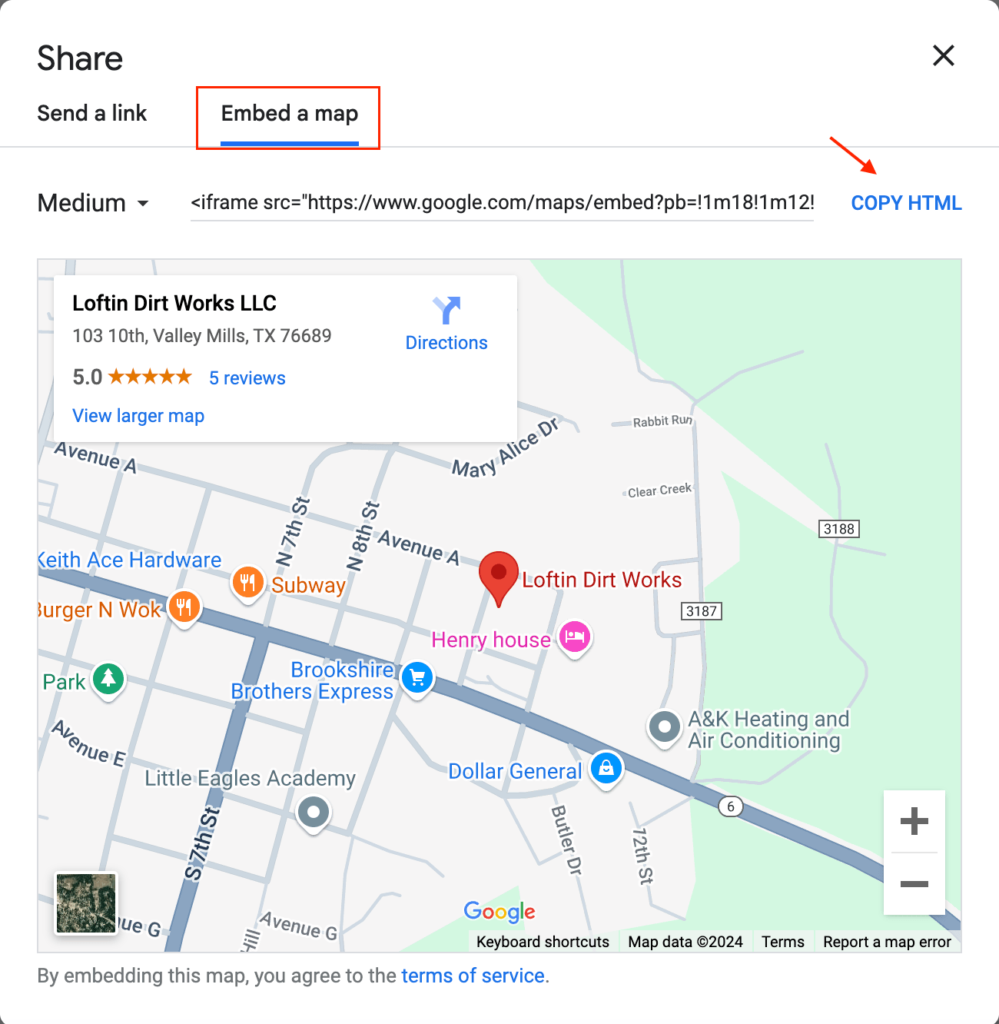
Another alternative to geotagging images is embedding Google Maps on website pages, such as Contact Us, Home, or City pages.

Google makes it easy for users to embed a map onto their website by providing a unique HTML code that can be copied and pasted into a custom WordPress element.

When combined with proper on-page SEO practices, embedded Google Maps are shown to contribute to Google Maps SEO.


Google Maps HTML Map Embed

GPS Photo Tagging Study

In one study conducted over one month, GPS photo tagging had a negligible effect on search engine rankings.

The study targeted 16 different keywords and involved 18 unique posts, each with its own geotagged image.

The study concluded that six keywords dropped in rankings (two were actually displaced to the 51st position or lower), nine remained unchanged, and only three improved their rankings (based on factors unrelated to the geotags).


Schema Pins Study

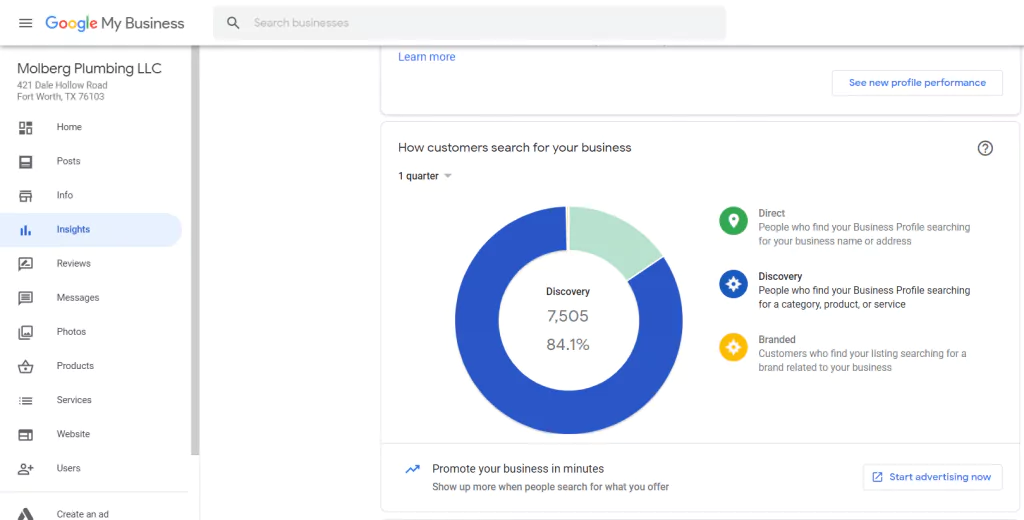
Schema Pins helped a local plumbing company reach an organic search discovery rate between 84% and 87%.

Schema Pins continually added fresh content to Molberg Plumbing LLC’s Google My Business page. After a year of use, Customer reviews for the company also tripled across multiple platforms.

While some still insist that GPS photo tags for Google My Business can help increase online exposure, the impact of Schema Pins is supported by actual data rather than industry speculation. 


Molberg GMB Insights (Screenshot)

How Schema Pins Impact Rankings

Schema pins influence search rankings by adding relevant content to a business website and increasing the frequency of customer reviews, both of which are confirmed ranking factors.

With the DataPins app, once a pin is added, a text with a link to a page where the customer can leave a review is automatically sent to them.

Studies have shown that this automated review request process is more effective than other methods for obtaining customer reviews. 


Final Verdict: Can Geotagging Photos Impact Ranking?

Geotagging photos cannot impact Google Maps rankings. Upon upload, Google Business Profile strips the image’s location data, meaning any information added to the file is immediately removed.

Furthermore, Google Business Profile would not use the data for ranking purposes, even if it did remain attached to the image file (it doesn’t).

While this tactic is unanimously disproven, some people confuse it with other local SEO techniques that do impact rankings, such as inserting schema markups like geo and place onto a website.


The DataPins tool automates this process for you, consolidating your job information into SEO signals for Google ranking purposes.