Blog

Backlinks vs. DataPins: Local SEO Case Study

DP
DATAPINS
Case Study · 2026
Plumbing Industry · Jupiter, FL Backlinks vs.
DataPins
A Local SEO Case Study
Drain to Drain (a DataPins user) launched in August 2023 with a brand-new domain, has 31 backlinks, and a domain authority of 8. Two established competitors held 10–28× more domain age, 26–384× more backlinks, and far greater authority — yet Drain to Drain outranked both across Map Pack and organic search.
Subject Drain to Drain
Market Jupiter, FL + 6 Cities
Keywords Tracked 210+ Queries
DataPins Published 382 Pins
Scroll
Three Sites.
One Winner.
On paper, Drain to Drain had no business competing — a 2-year-old domain against established local and national plumbing brands with decades of authority. The data tells a different story.
Drain to Drain DataPins User · draintodrain.com
Competitor 1 Local Plumber · Est. 2014
Competitor 2 National Franchise · Est. 1997
Competitor 1
DataPins 0
Domain Age 12 years
Domain Authority 21
Backlinks 811
Google Reviews 300
Map Pack Avg #1.90
Organic Avg #5.03
Competitor 2
DataPins 0
Domain Age 28 years
Domain Authority 61
Backlinks 11,900
Google Reviews 1,048
Map Pack Avg #2.00
Organic Avg #4.31
The Key Numbers
#1.67 Average Map Pack position for Drain to Drain — beating Competitor 1 (#1.90) and Competitor 2 (#2.00) Map Pack Winner
#2.81 Average organic ranking — nearly 2× better than Competitor 1 (#5.03) and Competitor 2 (#4.31) Organic Winner
384× More backlinks held by Competitor 2 (11,900 vs 31) — yet Drain to Drain ranked higher on both surfaces Authority Paradox
382 DataPins published by Drain to Drain — geo-tagged, schema-rich job check-ins documenting real work across 7 cities Digital Brand Signals
Map Pack Avg Ranking (Lower = Better)
Drain to Drain
#1.67
Competitor 1
#1.90
Competitor 2
#2.00
Organic Avg Ranking (Lower = Better)
Drain to Drain
#2.81
Competitor 1
#5.03
Competitor 2
#4.31
Backlinks (Higher = More Authority)
Drain to Drain
31
Competitor 1
811
Competitor 2
11,900
Domain Authority
Drain to Drain
DA 8
Competitor 1
DA 21
Competitor 2
DA 61
Full Metric
Comparison
Every measured signal across all three sites. Green values indicate the leading figure for that metric.
Metric Drain to Drain Competitor 1 Competitor 2
DataPins Published Geo-tagged job check-ins with schema markup 382 ↑ Only user 0 0
Map Pack Avg Ranking Avg position across all tracked keywords · lower = better #1.67 ↑ Best #1.90 #2.00
Organic Avg Ranking Avg position across all tracked keywords · lower = better #2.81 ↑ Best #5.03 #4.31
Domain Authority Moz DA · higher = stronger link profile 8 21 61
Backlinks Total inbound links from external domains 31 811 11,900
Google Reviews Total Google Business Profile reviews 310 300 1,048
Domain Age Years since domain registration 2 years 12 years 28 years
Where Drain to Drain
Dominates
A sample of high-value queries where the rankings tell the clearest story. Map Pack positions shown.
drain cleaning jupiter fl Map Pack
Drain to Drain #1
Competitor 1 Unranked
Competitor 2 #2
hydro jetting jupiter fl Map Pack
Drain to Drain #1
Competitor 1 Unranked
Competitor 2 Unranked
badger 5 garbage disposal repair jupiter fl Map Pack + Organic
Drain to Drain #1 / #1
Competitor 1 Unranked
Competitor 2 Unranked
sewer line repairs jupiter fl Map Pack + Organic
Drain to Drain #1 / #5
Competitor 1 Unranked
Competitor 2 Unranked
toto toilet installation jupiter fl Map Pack
Drain to Drain #1
Competitor 1 #2
Competitor 2 Unranked
commercial hydro jetting service jupiter fl Map Pack + Organic
Drain to Drain #3 / #1
Competitor 1 Unranked
Competitor 2 Unranked
drain cleaning north palm beach fl Map Pack
Drain to Drain #1
Competitor 1 Unranked
Competitor 2 Unranked
quarter turn hose bib installation jupiter fl Map Pack + Organic
Drain to Drain #1 / #1
Competitor 1 #1 / Unranked
Competitor 2 Unranked
Study Methodology Rankings, authority data, and site metrics were captured at a single point in time and compared across the three plumbing businesses serving the Jupiter, FL metro area.
01 Site Selection Drain to Drain was selected as the DataPins user subject. Two competing plumbing businesses with Google Business Profile addresses in the same city — one local, one national franchise — were chosen as the comparison group based on geographic market overlap.
02 Keyword Tracking Over 210 keyword queries were tracked across 7 cities: Jupiter, Tequesta, Jupiter Island, Juno Beach, Palm Beach Gardens, North Palm Beach, and Hobe Sound. Map Pack and organic positions were manually recorded from public Google search results using localized queries.
03 Authority Data Domain Authority and backlink counts were sourced from Moz’s publicly available link metrics. Google review counts were pulled from each business’s Google Business Profile. Domain registration dates were verified via public WHOIS records.
04 DataPins Count Total published pins were recorded from the Drain to Drain “pins” page at the time of the study. Each pin represents a geo-tagged, schema-marked job check-in published to the site.
Key Takeaways What this single-site case study suggests about how Google may weigh local relevance signals against traditional domain authority.
📍
382 Pins Beat 11,900 Backlinks Competitor 2 held 384× more backlinks and a DA of 61 versus Drain to Drain’s DA of 8 — yet ranked lower on both Map Pack and organic for this sampling of local queries. The geo-tagged job signal corpus Drain to Drain built through DataPins appears to carry more local relevance weight than raw link authority.
🗺️
Hyper-Specific Keywords Are Where DataPins Shines On brand-and-model keywords like “Badger 5 garbage disposal repair Jupiter FL” and “Rheem 75 gallon natural gas water heater installation,” Drain to Drain ranked #1 in both Map and organic while both competitors were entirely absent. These are exactly the types of queries DataPins generates content for automatically.
📐
Geographic Expansion Without Separate GBPs Drain to Drain ranked in the Map Pack for drain cleaning and hydro jetting in Tequesta, Jupiter Island, Juno Beach, Palm Beach Gardens, North Palm Beach, and Hobe Sound — without having an address in those cities. The geo-tagged pins appeared to have created a proximity and relevance signal across a roughly 10 mile radius.
🚀
A 2-Year-Old Domain Can Win in Competitive Markets Domain age is often cited as an insurmountable advantage for established players. Drain to Drain launched in August 2023 and within two years achieved better average rankings for these queries than a 12-year-old local competitor and a 28-year-old national brand.
A 2-year-old plumbing site with 31 backlinks outranked a national franchise with 11,900. In this comparison, a DataPins-powered website ranked higher than competitors with dramatically stronger backlink profiles, suggesting that backlinks are not necessarily more important than DataPins for local SEO performance. DataPins Research Team · 2026 · Jupiter, FL Observational Case Study
Map Pack SEO: Guide to Ranking in Google’s Local 3-Pack


Research indicates that Google’s Local Map 3-Pack receives between 40% and 50% of total clicks for local intent searches.

If your business appears among the three listings included in the pack, it can significantly boost local SEO performance.

The measures your business takes to secure one of these coveted spots on Google’s local search engine results pages is called Map Pack SEO.


The following guide outlines specific actions your business can take to improve Local Map 3-Pack visibility and highlights the best practices for Map Pack SEO in 2025.


Key Takeaways

  • Google’s Map 3-Pack receives between 40% and 50% of local clicks
  • Appearing in Google’s Map Pack can significantly boost local SEO performance
  • The measures a business takes to increase Map 3-Pack visibility are called Map Pack SEO
Map Pack SEO

What is the Google Map Pack?

The Google Map Pack is a set of three business listings that appear at the top of Google’s search results for location-based queries.

This Google SERP feature, also known as the local pack or map 3-pack, is coveted by small businesses as it directly impacts online visibility and lead generation.

The map pack features organic results, not sponsored listings, making it part of a business’s broader SEO strategy rather than a paid advertising campaign.


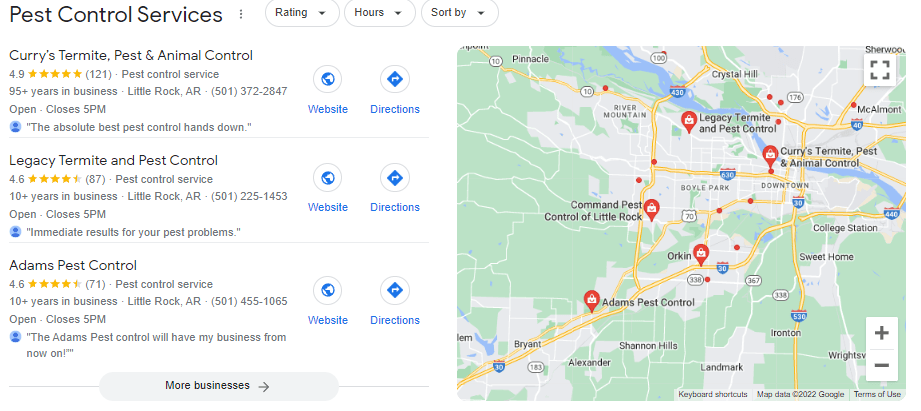
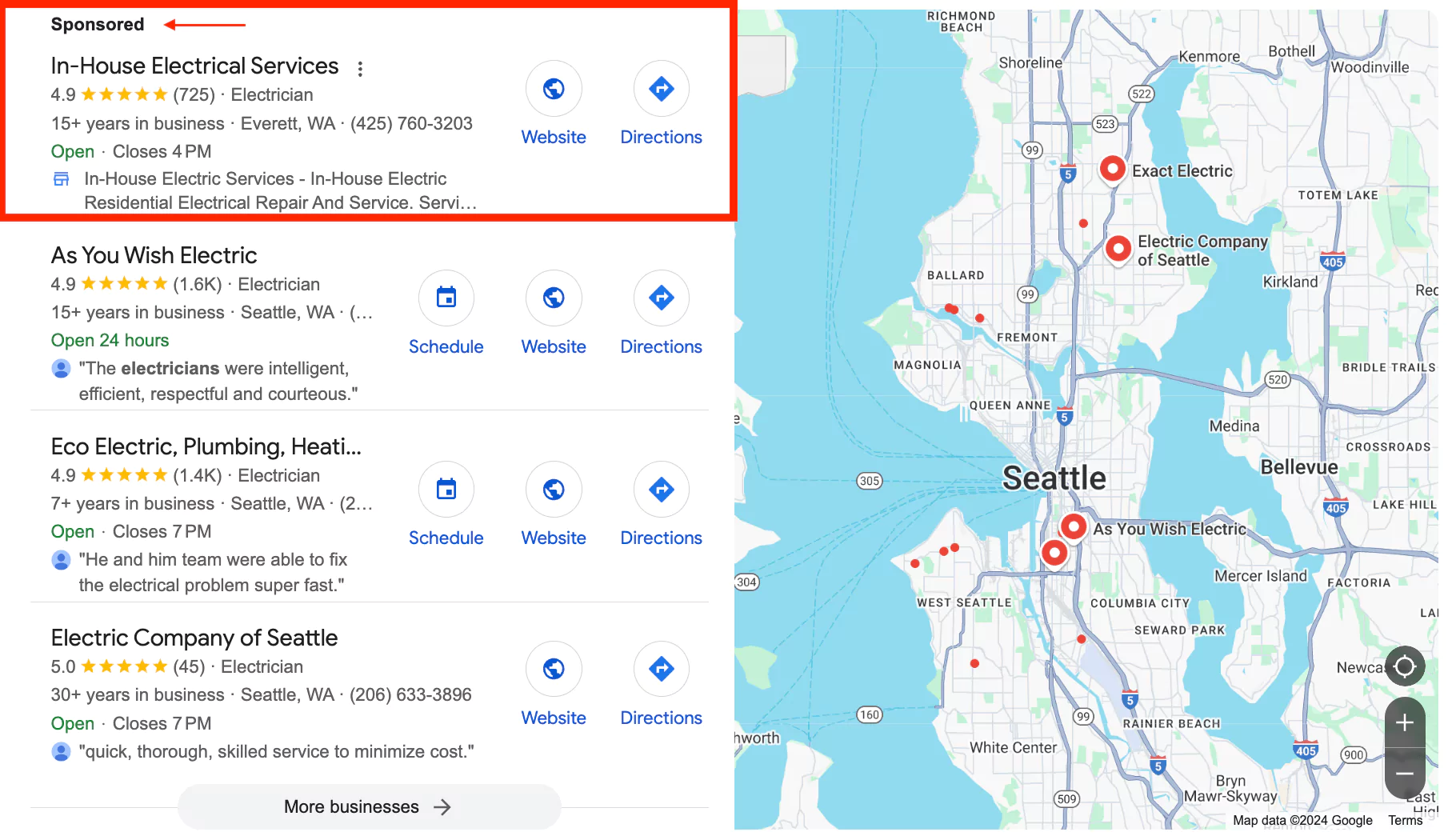
Map Pack SEO Example

Why Local Businesses Covet Map Pack Rankings

We noted that the map pack receives between 40% and 50% of total clicks for local intent searches, which is enough in itself to appeal to local businesses looking to generate leads online.

But aside from that obvious benefit, map pack visibility also helps legitimize a business by showing users verified customer reviews and contact information, leading to increased brand trust and recognition.

Another clear perk of ranking in this feature is its convenience for mobile users, who can quickly “click to call” your business directly from the local pack.


How Google Ranks Businesses in the Local Map Pack

Google’s map pack ranking algorithm is separate from its standard organic algorithm. However, many of the best practices for your website-based SEO strategy will also benefit your Google Maps SEO campaign.

The map pack algorithm itself has three primary ranking factors: relevance, distance, and prominence.


Relevance

Relevance is how well a Google Business Profile (GBP) matches the searcher’s intent. Fully completing your GBP with specific details can expand your relevance to more users.

However, don’t falsify your business name with keyword stuffing, as Google is likely to flag and suspend your listing.


Distance

Distance, often called proximity in this context, is the distance between your Google Business Profile address and the searcher’s projected location.

Although this algorithmic factor is primarily suited for storefront businesses, it still applies to service-area businesses.

Influencing the distance ranking factor is as simple as choosing a central business location within your primary service area.

However, don’t get any ideas about using a virtual location or any fake address, as Google’s automated systems can detect and penalize these actions by removing your listing from search.


Prominence

Prominence is how well-known your brand or business is to searchers.

Factors that can influence prominence include customer reviews, repitable backlinks to your website, and how frequently your brand name is searched on Google.


Optimizing Your Google Business Profile

The first and most important thing you must do to appear in the map pack is get listed on Google Business Profile.

Getting set up is free, though you will have to go through a verification process. You can get started here


Complete Every Section of Your Profile

Once you are listed, start filling out your profile with a concise description of your business, the areas you serve, the services you offer, your hours of operation, and accurate contact information.

Don’t forget to include a link to your main website, as your website-based SEO will directly influence your map 3-pack visibility.


Maintain Consistency Across All Platforms

Your NAP (name, address, and phone number) is like a digital ID for your local business. Citations help verify and disseminate that identification.

Directories like Yelp and Angi and social media platforms like Facebook and LinkedIn create NAP citations for your local business.

Off-page citations are any mention of your business or website anywhere other than your own website. The more of these citations you have, the more signs point to your website.


Keep Your Profile Fresh and Updated

Once you have everything set up, don’t just leave your profile idle. Instead, try to update it as often as possible. For example, if your company just started servicing a new area, add it to your profile.

In addition, people will be able to leave reviews of your business on your Google Business Profile, so be sure to respond to those reviews as much as possible. 

Remember that Google loves fresh content, so keep your Business Profile updated as much as possible.


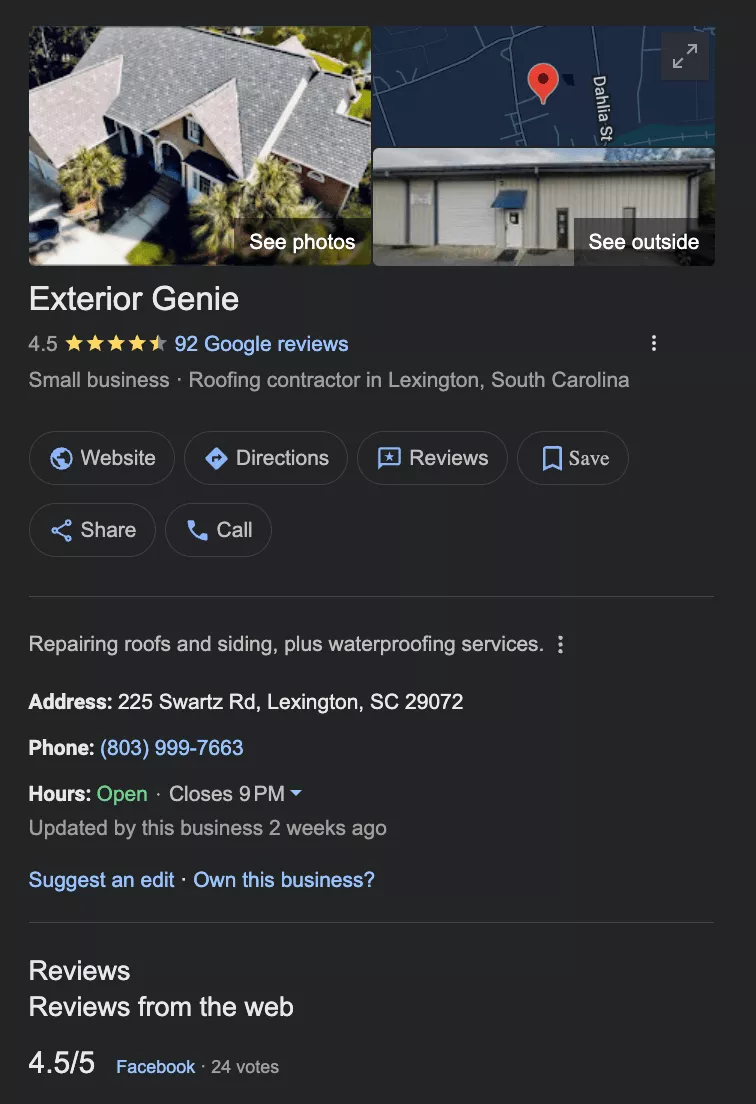
Screenshot of Local Google Business Profile

Add High-Quality Photos and Videos

Uploading original photos and videos of your staff, building, and services significantly boosts your profile’s quality.

Well-lit, in-focus photos in PNG or JPEG format perform best on Google and influence users’ decisions about whether to use your services.

Your cover photo should be 1024 x 576 px, while staff photos should be 720 x 720 px.


Getting More Google Reviews to Boost Map Pack SEO

It’s essential to get as many Google reviews as possible for your listing, and to keep doing so even if you’ve secured hundreds or even thousands of customer reviews.

Various software tools exist to send automated requests to your customers via SMS and email, helping boost response rates.

In addition, personally ask all your customers for a review after finishing a job. The majority of consumers will submit feedback if requested multiple times.


How to Respond to Google Reviews

When you notice a negative review, reply professionally and attempt to resolve the issue offline.

Customers will often remove the review or change it to a positive one if they feel that their grievance has been acknowledged or resolved.

You never want to get into an argument or trade insults with a customer, as it reflects poorly on your business, even if you’re objectively in the right.

You should also respond to positive reviews by thanking your customer for their business and encouraging them to use your services again.


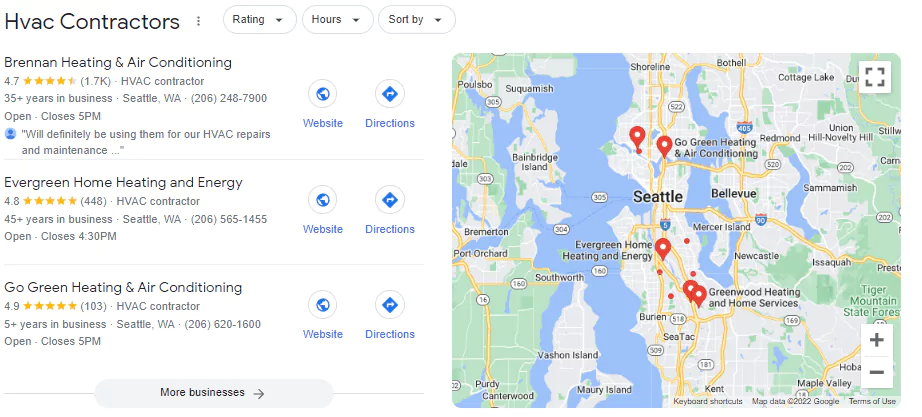
Seattle HVAC Company Map Results

Website SEO Strategies for Local Map Rankings

Standard SEO overlaps with Map Pack SEO via local website content. However, to utilize this method, you must include your website URL within your Google Business Profile under the website field.

Once you’ve connected your website to your Google Business Profile, your website’s content can start influencing your Map Pack rankings.


Publish Location Pages

Let’s say you operate a roofing company in Fort Worth, Texas. It’s relatively straightforward to appear in the Map Pack in Fort Worth.

However, showing up in nearby cities like Southlake and Grapevine requires publishing individual city pages.

The key to creating successful city pages is writing unique, locally driven content. Google’s algorithm is far too sophisticated to provide you credit for duplicate content pages.


Connect a Local Landing Page to Your Business Listing

Adding a local landing page or a service page can improve your Google Maps rankings for related queries. Google associates your website’s content with your Google Business Profile.

For example, say you run a plumbing business in Akron, Ohio. Whenever someone searches for plumbers in Akron, Google crawls websites associated with nearby map listings to find plumbing-related information.


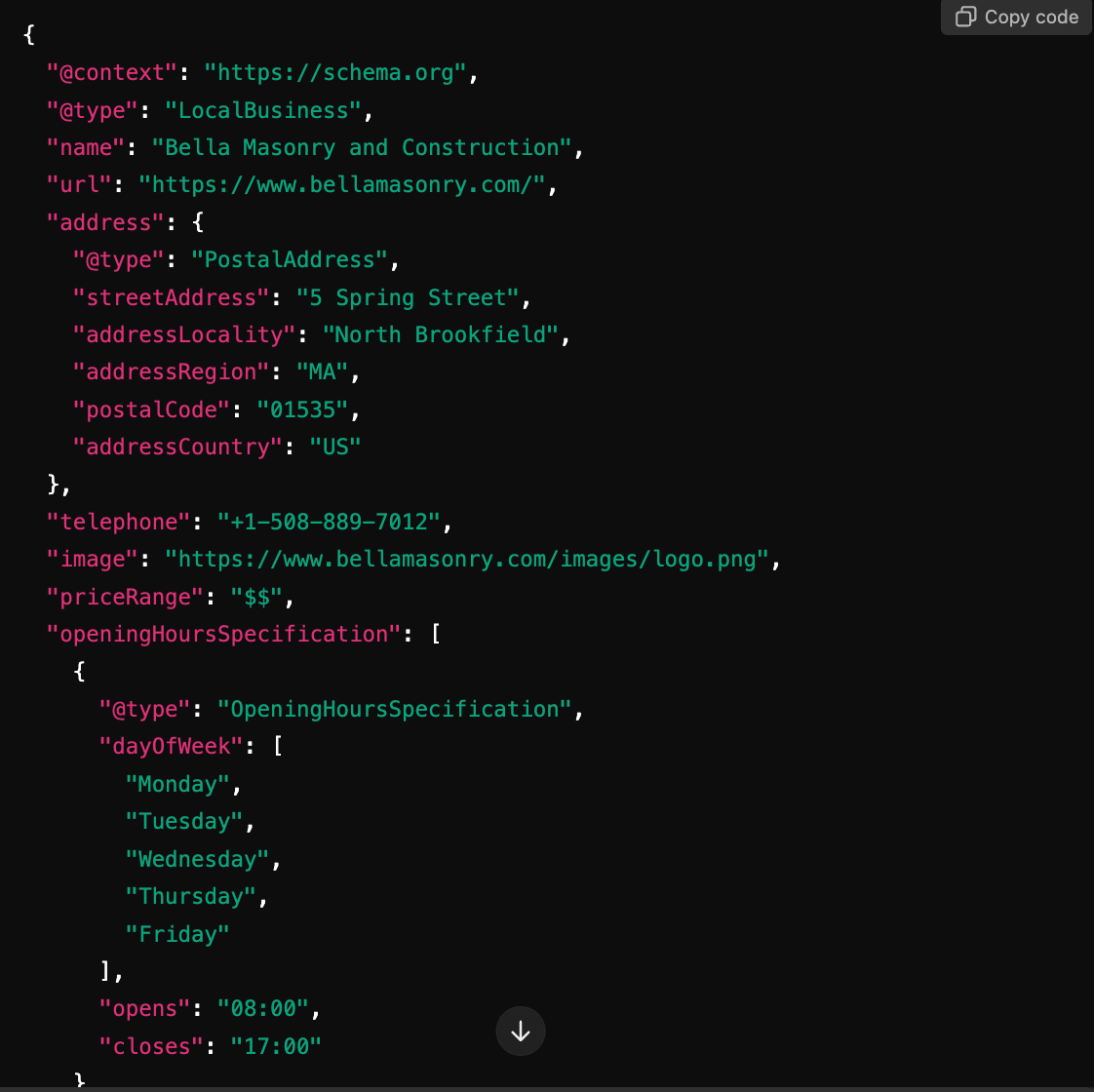
Add Local Business Schema

Schema markup is a structured data format injected into your homepage’s HTML code. It provides Google with context about your local business.

The LocalBusiness Schema helps you mark up business information, including your website URL, business name, address, phone number, and hours of operation.

Because Google scans the website URL associated with your GBP, the schema’s impact can extend to your Google Maps rankings.


Local Business Schema Example

Demonstrate Website E-E-A-T

Google’s objective is to show users legitimate, trustworthy businesses and avoid showing spam, which makes its E-E-A-T acronym highly relevant to local businesses.

E-E-A-T stands for experience, expertise, authoritativeness, and trustworthiness, and can be showcased on your business website (connected to your GBP).

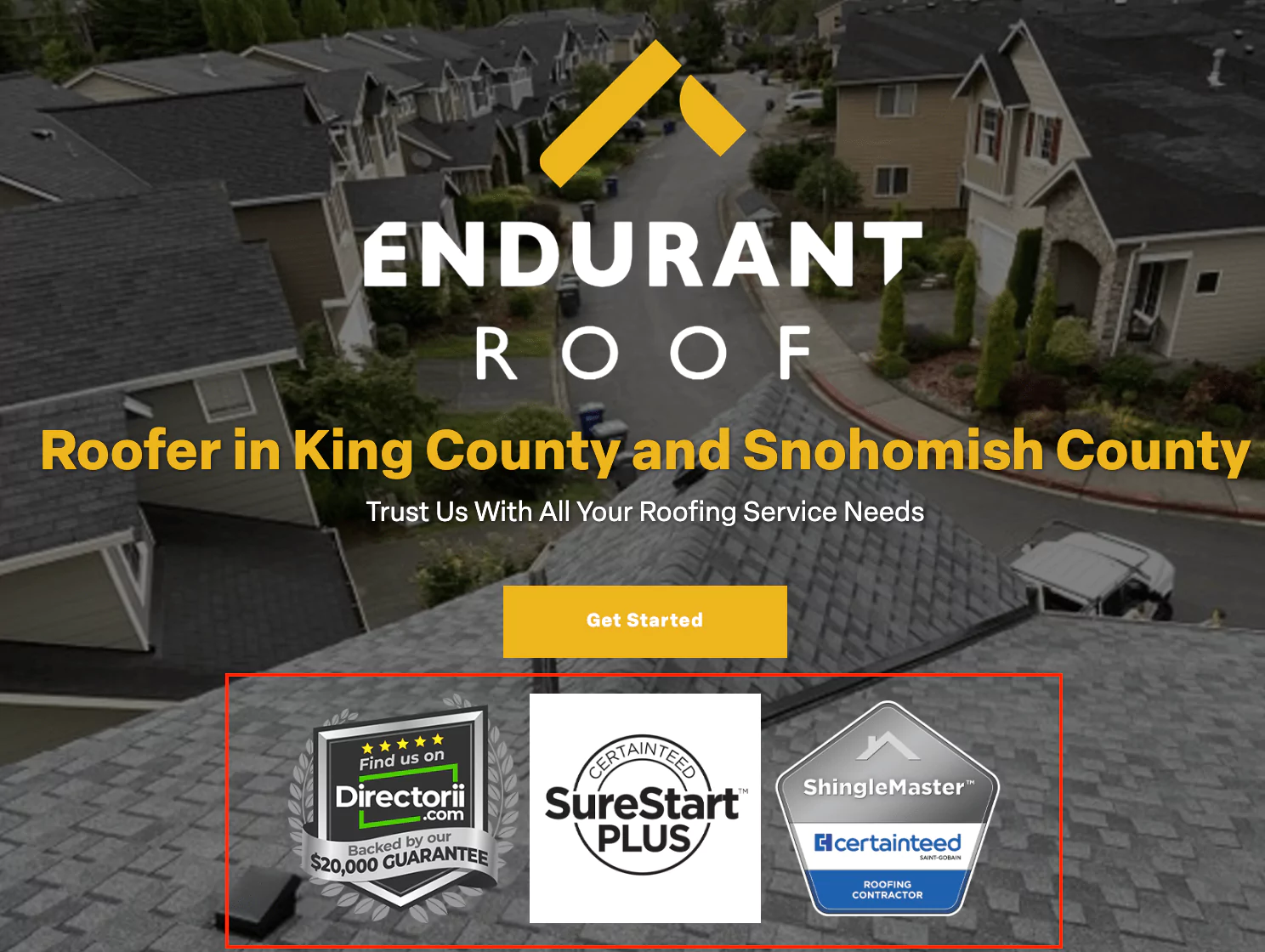
Examples of showing E-E-A-T on your website include award badges, recent job photos, and a review slider widget that pulls verified Google reviews via API.


Website E-E-A-T Example

Embed Google Maps on Your Site

Consider embedding a Google Map of your business location onto your website’s Contact Us page or, in some cases, the homepage.

This enhances the user experience for your website visitors by showing your business location in Google Maps. It also helps connect your web entities (website, GBP, citations) for a cohesive digital brand.

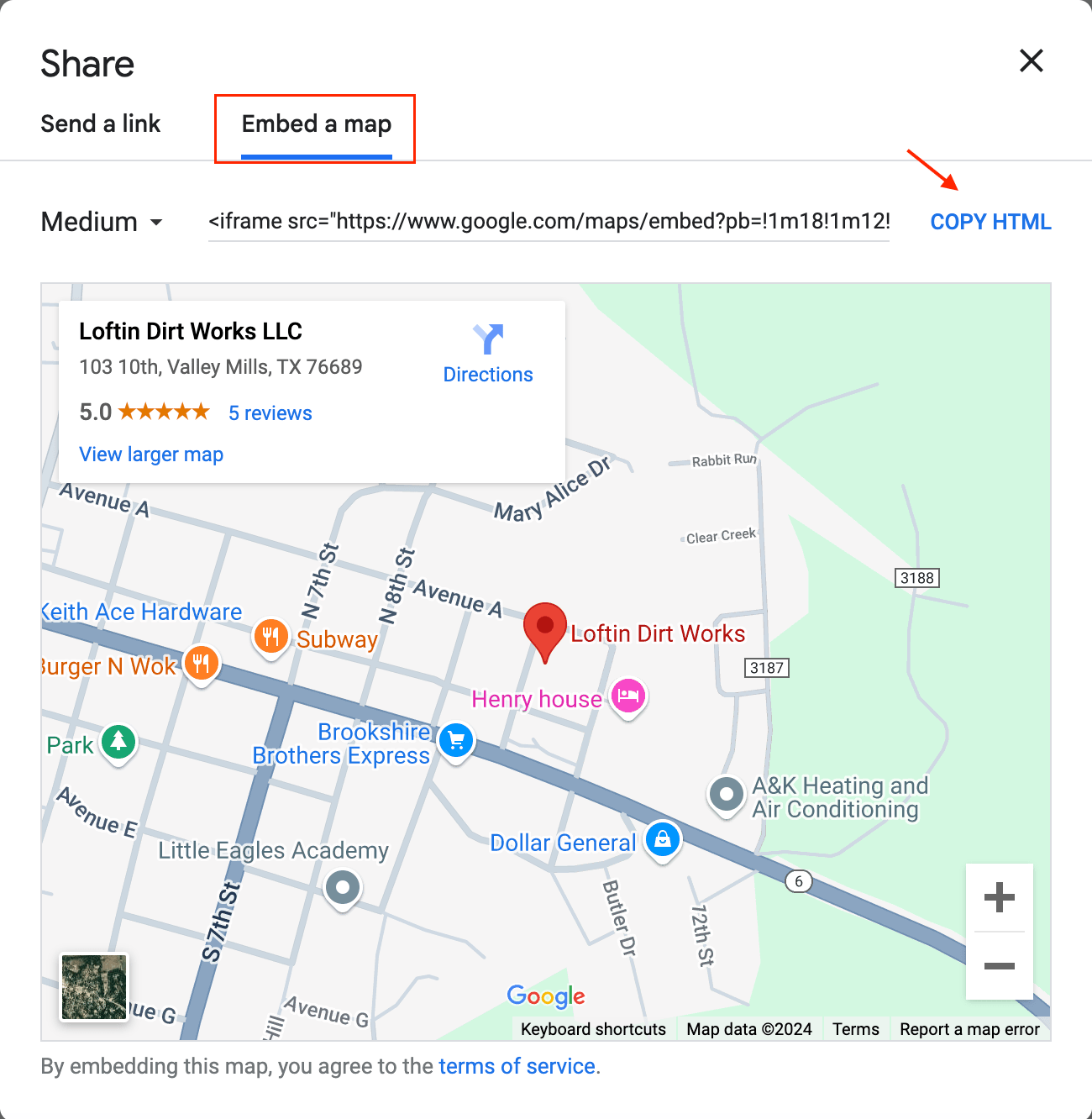
Google Maps makes embedding a map in your website easy by providing a “Share a map or location with others” button. This button generates custom HTML code you can copy and paste into a custom WordPress element.


Google Maps HTML Map Embed

Embed Reviews on Your Website

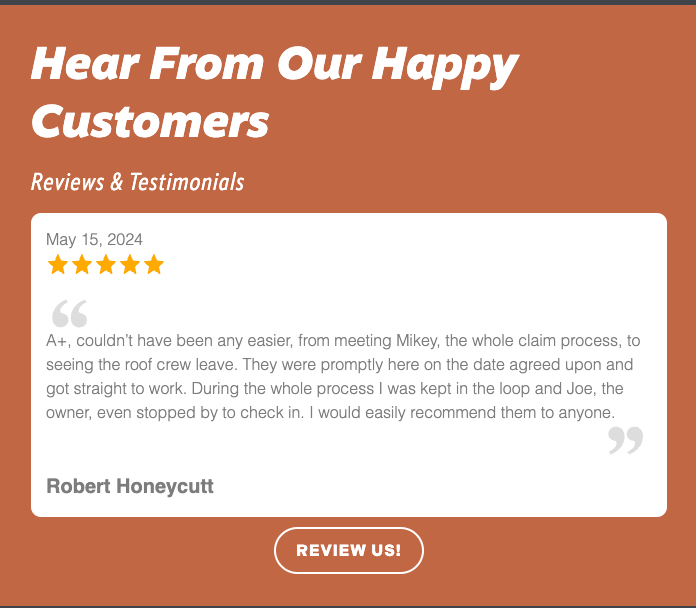
The reviews widget is a great way to integrate Google reviews into your website design.

Embedded reviews (through API sliders) are far more effective than publishing screenshots of your reviews, which can be easily doctored, especially in the age of artificial intelligence.

Embedding an API-driven reviews widget into your website’s codebase is the most effective way to leverage Google reviews for trust.


Website Reviews Widget

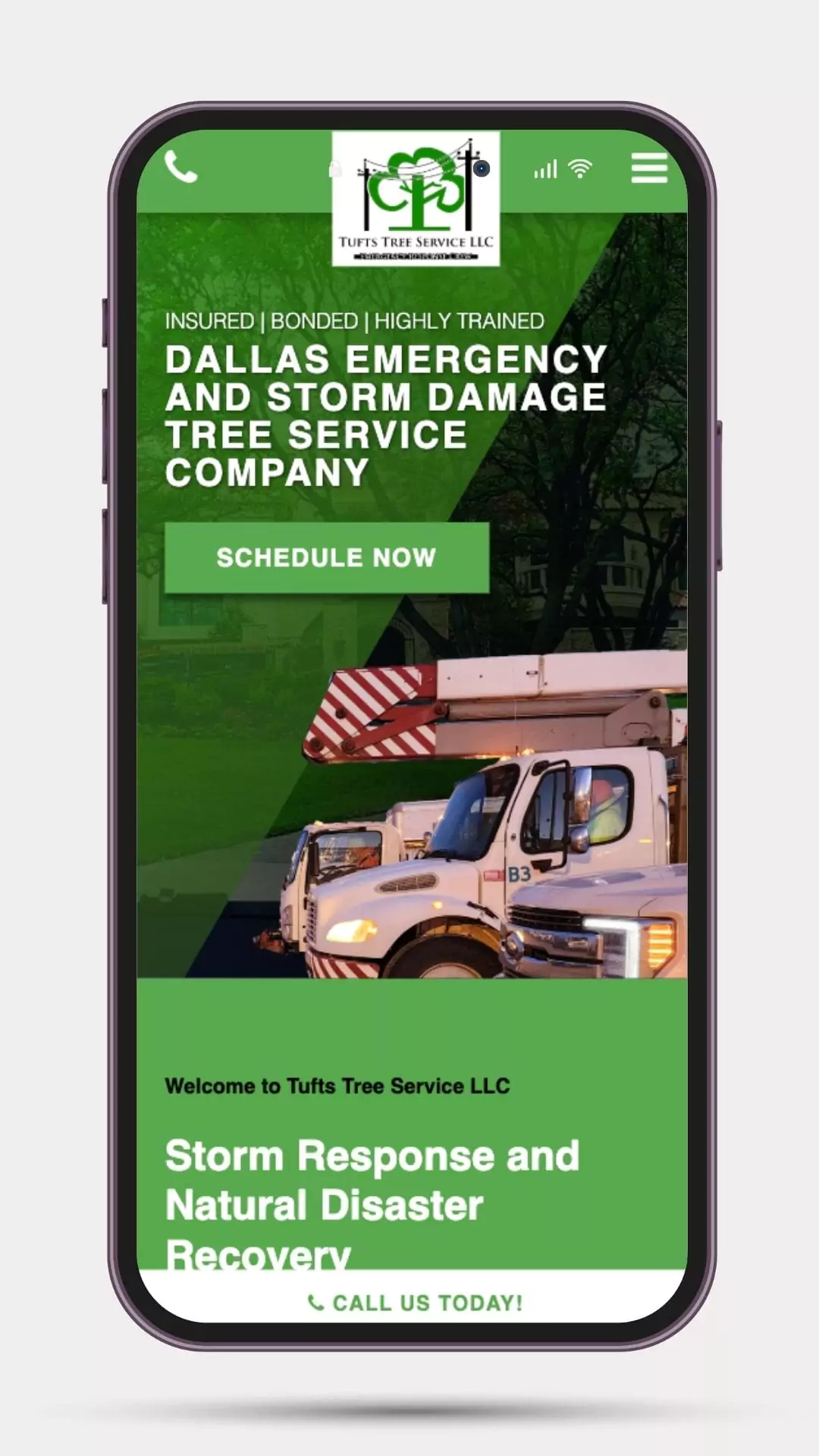
Use Responsive Web Design

Websites that users can adequately navigate across all device types (mobile, desktop, tablet) foster a superior user experience, enhancing Google Maps rankings.

After all, Google doesn’t want to send its Maps users to a website they cannot access through a mobile device.

Ensure your web developer uses RWD in your web design process and test your site across all device types.


Responsive Web Design

Acquiring Local Backlinks

Local links also influence Map Pack rankings for local businesses. As a result, many companies wonder whether they should build links to their Google Business Profile or their website.

The answer is always your website, and this is the link index the map pack algorithm considers when ranking your Google Business Profile.

We’ve already outlined how Google can associate your website URL with your Google Business Listing. As a result, the links pointing to your website will also influence your Google Maps rankings. 

Aside from the apparent SEO benefit, building links to your website ensures you own the digital property. For example, if you were to create links to a suspended profile, those links would be rendered useless.


Business Partnership Links

Asking for backlinks from any businesses you partner with is fair game in local SEO and can directly impact your map pack rankings.

Most legitimate businesses are willing to link to partners’ websites because it is considered standard business practice in the digital age.


Sponsorship / Community Links

Sponsorship and community-based links are also helpful for your Google Maps rankings, whether they come from a Little League organization or a church website.

These types of links are not meant to trick users or the algorithm, but instead demonstrate your associations with other credible local institutions in a digital format.

Most sponsored links include a rel=”sponsored” attribute, but that does not eliminate their positive impact on your map pack SEO.


Local PR and Media Coverage

Another above-board method for local link building is investing in PR and media coverage, which often results in local news websites linking back to your website.

In many cases, the news station will interview you or one of your employees for a relevant story related to your industry, and your quote is then included in the article with a link to your website.

Publishing 100% unique and data-driven reports about topics within your industry can also lead to natural media links, as journalists use search engines to find statistics related to their story.


Advanced Map Pack SEO Strategies

Covering the tasks above will put you in a great position to rank within the map 3-pack for your target keywords.

However, some business owners want to take even more measures to expand their visibility on Google Maps and the Map Pack.

Below, I will outline some advanced Map Pack SEO strategies I’ve encountered over my time in the industry.


Consider Moving Your Business Location

The most overlooked Map Pack SEO ranking factor is your map marker. Spoiler alert: Google Maps is an interactive map with markers for every business listing.

Even service-area businesses with hidden addresses have a map marker in Google Maps’ internal mapping system. Your Physical location will directly influence your rankings.

If your office address is in a prime location of a central metropolitan area, your listing will receive many more impressions than a business located on the outskirts.

Google’s proximity ranking factor is very significant. While you can’t manipulate your map marker, you always have the option to move your office to a better location.

Once you re-verify your business, Google will move your map marker to your new location. 


Use Google Maps Ads to Boost Engagement

Businesses with a visible physical address can appear in the Map 3-Pack through paid advertising with Google Ads Location Extensions and Performance Max campaigns.

Unfortunately, service area businesses (SABs) are not eligible for Map 3-Pack ads. We recommend utilizing Local Service Ads (LSA) for SABs.

While Local Service Ads do not appear within the Map 3-Pack, they integrate your Google Business Profile information, including reviews, into the ads.


Google Maps Ad Example

Increase Branded Searches

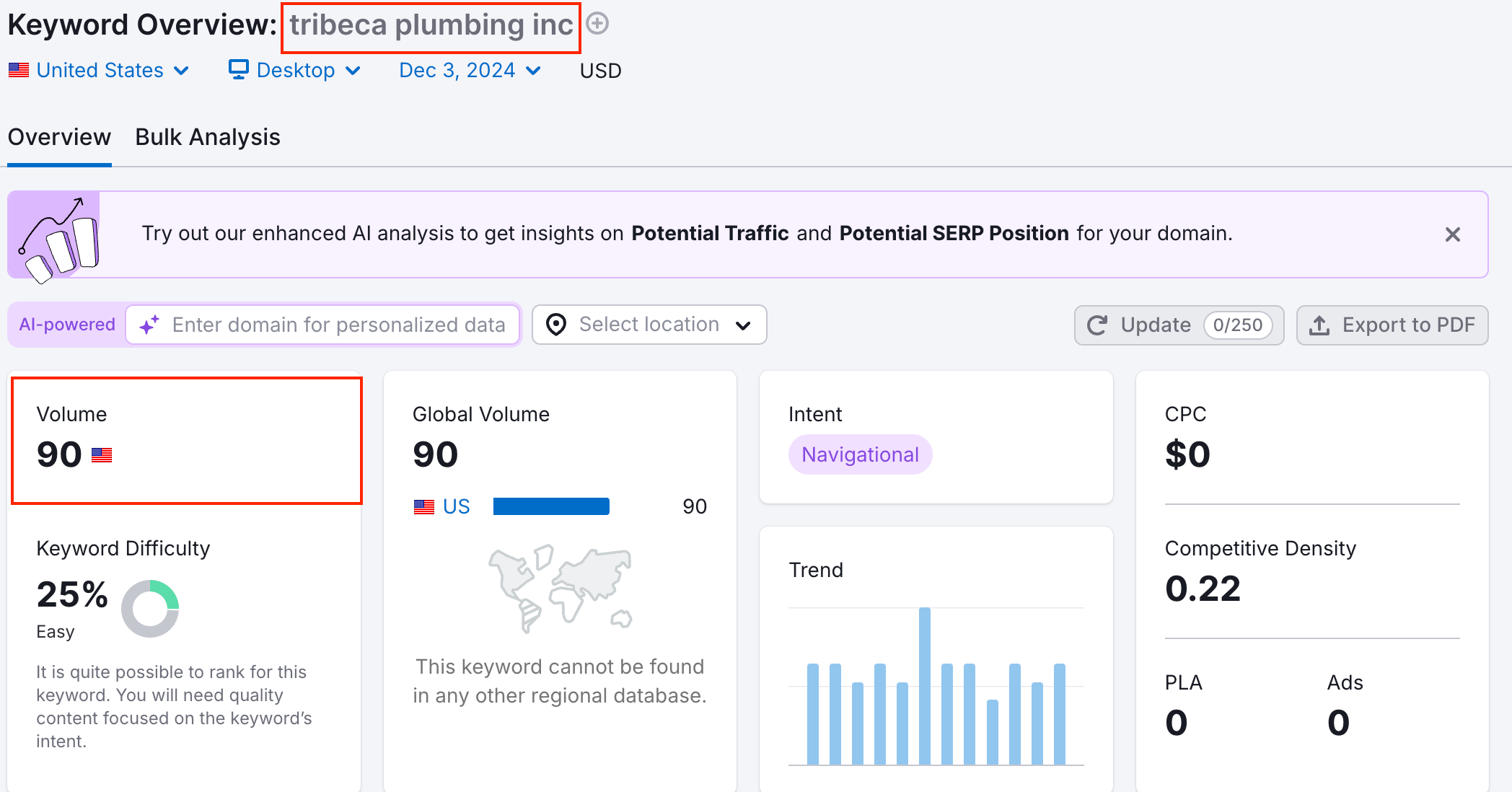
We know that Google Maps’ prominence ranking factor considers the popularity of brands that branded searches can influence.

When users search directly for your brand name, Google assumes they’ve learned about your company elsewhere, such as offline, digital advertising, or social media.

Considering this, you should get your brand out into the community as much as possible, both online and offline, to encourage more people to search for your name.


Branded Search Volume Example from SEMRush

Source: SEMRush


Measuring and Tracking Your Map Pack Performance

Google offers a Google Business Profile insights dashboard that lets business owners monitor their performance over time.

Metrics to look closely at include:


  • Views
  • Searches
  • Interactions
  • Calls
  • Website Clicks

The GBP Insights tools let you compare year-over-year numbers, so you can see, for example, how many more views your listing is getting in October 2025 vs. October 2024.


Next Steps for Map-Pack SEO

There are several easy first steps you can take to expand your presence on Maps after creating and verifying your Google Business Profile.

For example, ask your customers for reviews in person, in addition to the automated email requests.

Secondly, you can build or leverage partnerships with other local organizations to improve your backlink profile.

Improving your Map Pack SEO is easier than you might think, and you can continue building on your foundation as your visibility expands.


Does Each Service Business Location Need its Own Website?


Creating separate websites for each sufficiently distant service-based business location is not only the most effective strategy but also the one that Google recommends within its guidelines.


Their guidelines for representing your business on Google state the following:


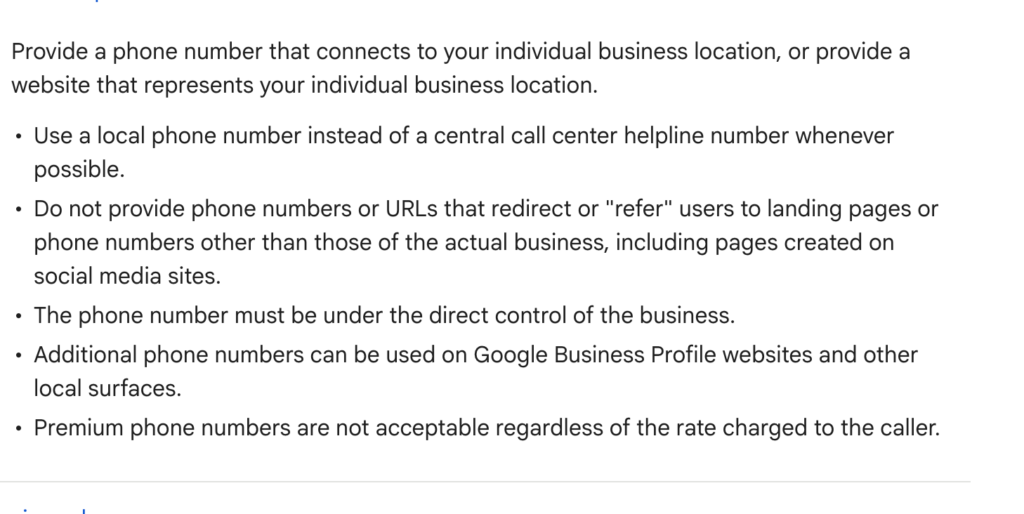
SAB Google Guidelines

“Provide a phone number that connects to your individual business location, or provide a website that represents your individual business location.”


That language is quite clear: When adding a website to your Google Business Profile, it should represent the specific business location, not an interior page (location page) or subfolder for a website that primarily represents a different business location.


Service Business Location Website (Blog Cover)

Despite clear guidelines about separate websites for separate locations, you would not reach this conclusion by speaking with an SEO expert, or asking Google’s AI Mode or AI Overviews for advice on this matter.

Why?

Because the SEO industry has long fed into a false narrative that subfolders and location pages are the only reasonable strategy for multi-location service businesses.


How The Wrong Practice Became “Mainstream” SEO Advice

Most people within the local SEO community recommend using a single domain for multiple service business locations.

When I say service businesses, I’m talking about plumbers, roofers, electricians, etc.

The reasons given by SEO professionals often overlap, citing consolidated backlinks, website authority, and brand consistency.


Google’s own AI Overviews will echo these sentiments by stating:


SAB Websites AI Overview

“For multiple business locations, it’s generally better to use a single website with dedicated, location-specific pages rather than creating separate websites for each location. This strategy unifies your brand, consolidates SEO efforts, and offers customers a consistent experience, while also allowing for local targeting through Google Business Profiles and localized content on your single”


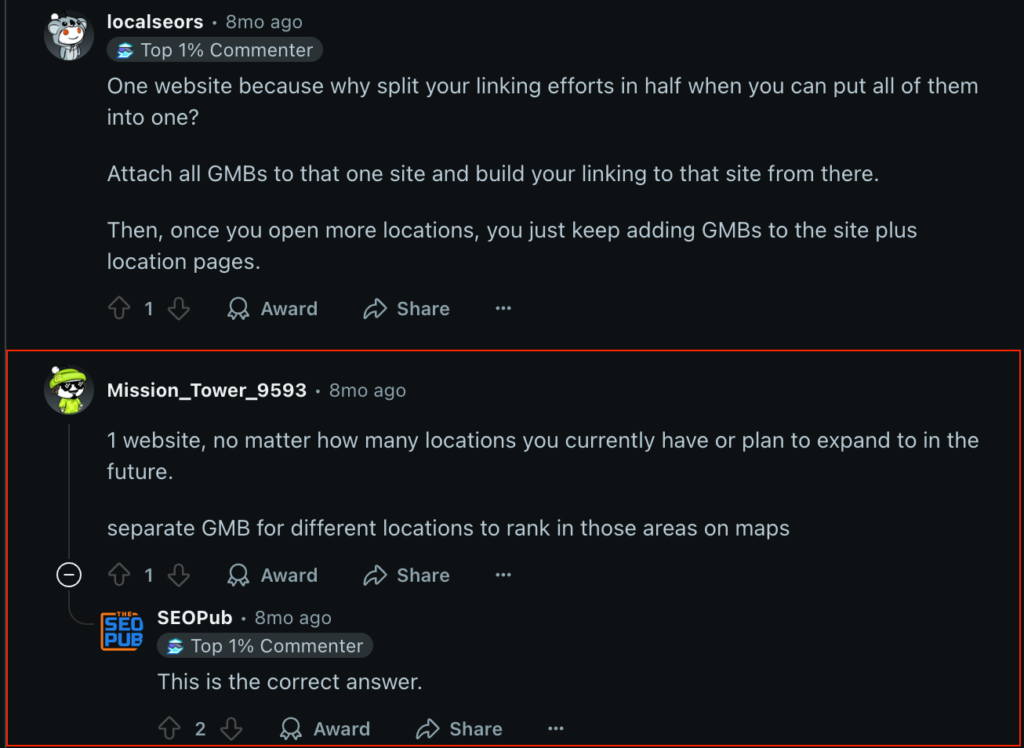
This point of view is not limited to optimized articles on agency websites or even AI-generated responses that have synthesized those arguments. It also includes users on forums like Reddit.


One Reddit user even stated:


SAB Websites Reddit Comments

“1 website, no matter how many locations you currently have or plan to expand to in the future. separate GMB for different locations to rank in those areas on maps”


The Incentive of The Single Domain Status Quo

Unsurprisingly, none of the statements cited above, ranging from AI-generated responses to real Reddit users, cites any evidence or data for their findings, but instead frames them as an indisputable truth that is merely understood by those within the SEO industry.

You might ask why the industry is so adamant about a strategy that lacks supporting case studies or confirmation from Google officials.

Aside from the fear of “being wrong”, here are some of the SEO industry’s other possible reasons for perpetuating this myth:


Agency Profit and Scalability

Money always talks, and it’s easier for an agency to measure, manage, and itemize work on a single website than to create, optimize, and manage multiple websites.


Spam Misconceptions

There’s a distorted fear within the industry that creating multiple websites is seen as “spam.”

This fear is especially ironic because the strategy they recommend (mass-producing location pages) is prohibited by Google’s guidelines, which allude to these types of pages as doorway pages.


Hard to Explain

When selling to a business owner, and a SAB in particular, it’s easier to keep things simple than to help them succeed.

Many clients don’t understand why they need multiple websites, and it’s an easier sale just to let them target every location on one website.


Misunderstanding of Link Equity

Agencies want to be able to show their clients a significant domain authority, domain rating, or other 3rd party metric that makes their website “seem” authoritative without providing the nuanced explanation of how the local context of a backlink has a greater influence on rankings and traffic than a singular metric.


Misunderstanding of Vector Embeddings

Most SEOs don’t know what vector embeddings are or how a site’s core site vector becomes diluted when adding content (including local content) that does not align with the primary topic or location.


Reasons to Create a New Website for a New Service Location

Simply refuting the claims of the broader SEO industry is insufficient for challenging their general premise, that all service locations should be nested under a single branded domain.


There are profound reasons why creating separate websites for separate locations is beneficial to success.


1) Local Link Context

The notion that domain rating or authority can be viewed as a single number within a local context is fundamentally flawed.


As Mike King of iPullRank, one of the most technically-focused SEO professionals, stated:


“We’ve learned that, where the pages that link to you sit in the different levels of the index impact how much authority that they pass. But every link index is still using the same metrics that they were using, for the last 15 years.”


Achieving your 60+ domain rating on a local plumbing website might help you market your agency, but it is unlikely to help that plumber rank and grow their business.

The context of local links matters more than the volume. For instance, a San Diego chamber of commerce link to a Los Angeles-based plumbing company lacks the potency that it would have for a San Diego-based plumbing company.

The further away your locations are from one another, the more irrelevant your backlinks become in a local context.


That Little League sponsorship link you received for your Dallas-based roofing company’s homepage suddenly becomes confusing in relation to your Atlanta location page after you expand your roofing business across state lines.

Conversely, suppose you create an entirely new website for that Atlanta location. In that case, you can then seek out the Atlanta-based sponsorship link to maintain a clean, relevant, and influential local link profile.


2) Vector Embeddings

Keyword research tools like SEMrush and Ahrefs don’t operate the way Google and, especially, Google’s Gemini and its AI tools do today.

Vector embeddings are like consolations in space; they represent semantic distances from one topic to another.

Each local service website has a core site vector, such as electrician seattle. When you start adding pages about roofing or Minneapolis, you dilute that site vector, potentially reducing your rankings, clicks, mentions, and citations.


Vector embeddings are not the only SEO or GEO ranking factor, which means adding such pages is not an automatic “death sentence” to your digital marketing efforts.

However, doing so is far from a best practice. It can significantly hinder or diminish your progress if not outweighed by other weighted factors, such as brand authority, reviews, internal linking, and content quality.

That’s why when SEOs celebrate one of their clients’ service websites ranking across state lines, they are fundamentally misunderstanding the variables that are resulting in those rankings.


To put it simply, those websites are not ranking because of their SEO strategy but rather despite it.

What most within the SEO industry don’t realize is that many of the highest-ranking websites are not perfectly optimized; they simply have advantages that SEO practitioners cannot influence, such as offline popularity or strong brand recognition.

If SEO practitioners used best practices, such as creating a new website for a new service location, they would further increase that company’s business and profitability.


Instead, they celebrate the “results” that the SEO practitioner had nothing to do with and cite them as evidence as to why their strategy works.

However, when dealing with smaller businesses that lack those built-in advantages, understanding core site vectors and engaging in best SEO practices are exceedingly more crucial to their success.


When a Single Domain Strategy Makes Sense

In some cases, a single-domain strategy is not only appropriate but also optimal, such as for enterprise-level brands with a strong national presence and storefront-based businesses.


A single domain strategy works for enterprise-level brands when these conditions are met:


  • The brand garners national trust and recognition
  • The user intent is brand-first, instead of service-first

For example, when users search for a well-known brand like Home Depot, they don’t expect or require a distinct website for each location.

Instead, they expect to find a central brand domain that routes them to a local store through a subfolder or a store locator.


The same concept applies to brands like Target, AT&T, and Starbucks, as users are not searching for a query like “coffee near me” but rather the specific brand.

The key difference is that these brands are not service area businesses (SABs), such as plumbers or roofers.

The single-domain logic breaks down for local contractors, as users expect a local service.

Google understands the differences, and the businesses themselves need to know how Google views their specific business.


The Distance Variable for SABs

Another case in which a single domain is optimal for a local SEO campaign is when a business has multiple locations within a confined radius.

For example, a local plumber who has two verified Google Business Profiles in the same zip code should not create a second website for the second GBP.

Their website already targets the city in which both profiles are verified, meaning their website satisfies the user intent for both Google Business Profiles.


A separate website typically becomes optimal when your business location is 51 miles or further from your primary location.

The precise distance may vary by market, as some rural areas have a wider search radius (from the user’s perspective) than metropolitan areas.


Final Verdict: Multiple Websites are Often Necessary for SABs

Despite an echo chamber of misinformation, Google’s guidelines plainly recommend having individual websites for each distinguishable service location.

While blindly adhering to Google’s guidelines without testing is unwise, the most innovative and trustworthy SEO voices have also introduced concepts that support creating multiple websites for service area businesses with numerous locations that span a wide service area.

Understanding how vector embeddings influence search results, link context, and AI responses helps contextualize the nuance of service area business websites for multiple locations.


The broader takeaway from this is that things considered “best practice” within SEO communities have often gone untested and are perpetuated for reasons unrelated to objective performance.

As a result, testing your own unproven theories is the best way to confirm or debunk them so your business can succeed.


Yelp Vs. Google Reviews (Which Are More Important?)


The debate between Yelp and Google has been a topic of discussion among small business owners for more than a decade. While it was once a legitimate comparison, Google reviews are far more critical than Yelp reviews in 2025.

The numbers are indisputable: most consumers check Google reviews, while fewer than half check Yelp.


Key Takeaway

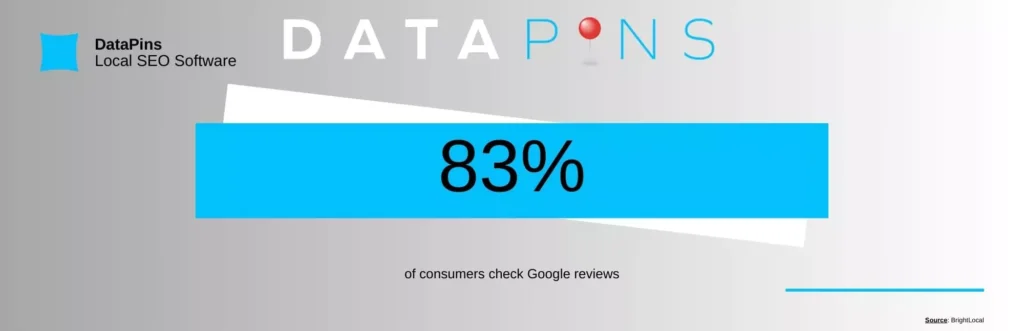
According to a 2025 BrightLocal survey, 83% of consumers check Google reviews, compared to just 44% who check Yelp reviews.


Yelp vs. Google (Blog Cover)

The Best Platform for Customer Reviews

Google is the best platform for customer reviews, as they contribute most to your online visibility.

Google dominates the U.S. search engine market share at 88%, meaning most of your future customers are active on the platform.

Your Google reviews are displayed to users every time they view your Google Business Profile (formerly Google My Business), which can appear in Map 3-Pack results, branded search results (via the knowledge graph), and Google Maps results.


Google Review Statistic

The Multi-Platform Review Caveat

While Google reviews are more impactful than their Yelp counterparts, 74% of consumers still check two or more review platforms when researching a business.

Since Yelp garners the second-highest consumer use percentage among review platforms, many of your customers are likely checking both before deciding on whether to use your services.

This makes it essential to invest in review management software to ensure your business is represented across multiple platforms.


Yelp Vs. Google: Lead Generation

A Google Business Profile listing is likely to appear when someone searches for a relevant term on Google.

Your Yelp profile may also appear, but it will likely be lower on the search engine results page.

In general, Google Business Profile will make you more visible to those using Google, which accounts for about 8.5 billion searches per day

Compare that to the 178 million monthly users on Yelp, and you can already see a bit of a discrepancy. 


Google Business Profile

One of the most fantastic things about Google Business Profile is that you can use your free listing to generate more leads for your business.

The platform enables you to write a bio and share essential information, including the areas your business serves, the services you offer, and an overview of your business. 

The more you fill out your profile, the more visible you will be to people in need of your services. 


Yelp for Business

Yelp business listings are also free, but they are less likely to generate leads organically without paying for ads.

Yelp businesses can spend as little as $5 per day to appear in “sponsored” results for location-specific keywords.

This setup differs from Google Business Profile, which can appear on Map 3-Pack listings without payment.


Yelp Vs. Google: Mobile Experience

Both Google My Business and Yelp have mobile apps. Both are also helpful for business owners.

You can do anything on the desktop version, making it quite convenient when you’re on the go. 

You can reply to reviews on both mobile apps during downtime and even update your business’s information. However, inequality is more evident on the consumer side.


While 63% of Google’s organic search traffic comes from people using mobile devices, the Yelp mobile app is used much more frequently. The Yelp app has 37 million unique users every month.

However, Yelp’s mobile app is most closely associated with reading restaurant reviews.

While you can find pretty much everything on Yelp and even devoted tabs for home and auto services, you will see the first tab for restaurants.


Yelp Vs. Google: Requesting Reviews

Asking for reviews is crucial for maintaining your business’s online reputation. Especially since 72% of consumers are more likely to leave a review if asked.

Google Business Profile has a distinct advantage because you can directly ask consumers for reviews. You can create a short link to your review page and send it to all your customers. 

Yelp not only discourages you from requesting reviews directly from customers, but it may also violate their terms of service. 


Google Business Profile Benefits

Google My Business is generally considered the best review platform for most businesses, especially contractors.

Because of its integration with the world’s leading search engine, Google reviews’ benefits are immense:


Local SEO 

Google Business Profile is essential if you want your business to be more visible in relevant search results. Of course, Yelp listings will also appear on Google results, but not as prominently.

Google prioritizes its platform and will likely list a Google Business Profile listing higher than a Yelp listing.


Ease of Use

With Google, your customers won’t have to create a special account to leave a review. Instead, they only need a Gmail account, which most people have anyway.


Trust

It’s much harder to dispute a review on Google than it is on Yelp, so people tend to trust Google reviews more. Furthermore, Google reviews often appear at the top of search results, thereby automatically establishing trust.


Google Business Profile Drawbacks

Although Google offers numerous appealing benefits, it also has a few drawbacks.

While these should not discourage business owners from focusing on the platform, they should be monitored to avoid pitfalls.


Slow Posting

Google reviews take longer to post than Yelp reviews, which are nearly instantaneous. 


Disputes

As we mentioned in the pros, Google reviews are hard to dispute – a definite con if you have an inaccurate review on your hands.


Yelp Benefits

Yelp remains a proficient review platform for small businesses, even if it has lost some of its market share to Google and other platforms.

While Yelp’s domain authority allows it to appear high in search results for most queries, it’s still lower than Google Maps 3-Pack results.


Great for Restaurants

If you’re in the food business, you want to be listed on Yelp.


Disputes 

Yelp makes it easier to dispute reviews and remove them if they are deemed biased or inaccurate. 


Yelp Drawbacks

Yelp has faced its share of criticisms in recent years, particularly regarding its increasingly strict review filters.

Yelp’s reputation has suffered because of its seemingly arbitrary decisions to terminate business listings. Take a look at some of the common criticisms:


Autonomy

Yelp reviews are filtered, which means they can reject a review if they determine that it violates their terms of service. 


Listing Termination

Yelp can terminate your listing at any time and has been known to wield its power liberally. 


Yelp vs. Google: Final Call

Google reviews should be your primary focus if you’re a contractor or any non-restaurant business, as they help more with SEO and are beneficial to all companies, not just restaurants. 

Ultimately, however, you should aim to collect reviews on both platforms and showcase them on your primary website.

The DataPins Local SEO plugin allows you to request reviews on Google and Yelp and display them directly on your website.


Ranking Your Website & Brand on ChatGPT


Ranking on ChatGPT is a meaningful goal for businesses, but it often requires an additional layer of framework beyond traditional search optimization. 

The data is stark, as ChatGPT reached 900 million weekly active users by early 2026, according to OpenAI’s figures, making it the fastest-growing platform in internet history.

While Google remains the top platform for web traffic, sending approximately 190 times as much referral traffic to websites as ChatGPT (per Ahrefs), both platforms matter.

The following guide outlines how to go about ranking your website and brand on ChatGPT.


Ranking Your Website on ChatGPT (Blog Cover)

Key Takeaways:


  • ChatGPT prioritizes brands based on mentions across credible platforms
  • Several tactics produce the most consistent results for businesses: accumulating reviews across multiple platforms, earning brand mentions in third-party content, and being indexed in Bing search results
  • ChatGPT and Google AI Overviews are distinct systems with different data sources and optimization logic; tactics that work for one do not automatically transfer to the other
  • ChatGPT refers significantly less website traffic than standard Google search results; visibility in ChatGPT responses is more of a brand awareness and trust signal than a direct traffic channel
  • These tactics produce limited results for businesses with no existing digital footprint, no reviews, or no indexable website content

Understanding How ChatGPT Ranks Content

ChatGPT does not rank websites the way Google does. It prioritizes brands, businesses, and sources when constructing responses, using a set of signals that extend beyond traditional search ranking factors.

For businesses, the practical goal is a consistent appearance in ChatGPT responses to queries that lead to new customers.


The signals ChatGPT weighs when deciding which businesses to surface include:


  • Brand Mentions: Consistent references to your business across credible third-party platforms, including directories, review sites, news coverage, and industry publications. SEO researcher Rand Fishkin has argued that brand mentions are becoming a more reliable indicator of authority than backlinks in the AI-driven search landscape, as they reflect genuine conversation about a brand rather than link acquisition.
  • Relevance: Match between your business’s documented services and the semantic meaning of the user’s query, including location signals for local service queries.
  • Reviews: Verifiable customer feedback on platforms such as Google Business Profile, Yelp, and TrustPilot. According to a study reported by Search Engine Journal, domains with active profiles on multiple review platforms averaged 4.6 to 6.3 ChatGPT citations, compared to 1.8 for domains without such profiles.
  • Source Authority: ChatGPT weights its training data by credibility. Content from established reference sources, industry publications, and platforms with high domain authority is more likely to influence responses than content from low-authority or thin sites.
  • Weighted Training Data: ChatGPT’s responses draw on training data, with more credible and frequently-cited sources receiving greater weight in how the model understands a category or business.
  • Jobsite Documentation: Based on DataPins’ analysis of contractor client sites, geo-tagged job documentation published directly on a contractor’s website functions as a location and service signal that ChatGPT can identify and surface in responses. (See Tactic 6 for full disclosure on this claim.)

Every ChatGPT user receives a different response. Visibility in ChatGPT is less consistent than a Google ranking position, and results will vary by user location, query phrasing, and session context.


ChatGPT vs. Google AI Overviews: Key Differences

FactorChatGPTGoogle AI Overviews / AI Mode
Primary data sourceTraining data + real-time Bing index (via OAI-SearchBot)Google’s own Search index via RAG (retrieval-augmented generation)
Query behaviorRewrites user queries into targeted sub-queries; partners with third-party search providersGenerates concurrent fan-out queries from Google’s index
Local business dataPulls from third-party mentions, review platforms, and crawlable web contentPulls directly from Google Business Profile as primary data source
Optimization foundationBrand mentions, review platform presence, crawlable contentFoundational SEO: Google Search Central confirms AI Overviews are rooted in core Search ranking systems
Referral trafficLow: Traditional Google Search sends 190x more traffic to websites (Ahrefs, February 2026)Low: Only 4.5% of AI Mode sessions result in a click (iPullRank, July 2025)
Primary optimization leversThird-party brand mentions, review profile diversity, Bing optimizationGoogle and GBP optimization, Third-party brand mentions, Entity depth

6 Proven Ways to Rank on ChatGPT Search


1) Allow ChatGPT to Crawl Your Website

Crawlability is the foundation of ChatGPT visibility. OpenAI operates three distinct crawlers, each with a different function, according to OpenAI’s official crawler documentation. GPTBot collects content for model training. 

OAI-SearchBot indexes content for ChatGPT’s search features. ChatGPT-User accesses specific pages during real-time user-initiated browsing sessions. Each can be controlled independently through your robots.txt file.

For most websites, no additional configuration is needed. ChatGPT can access publicly available content through its crawlers unless your robots.txt file explicitly blocks them. 

While real-time browsing can sometimes execute scripts, OpenAI’s bulk indexing and training crawlers generally do not execute JavaScript. If your site relies heavily on complex client-side frameworks, critical text may be invisible to them.

Regarding llms.txt files: Google Search Central’s official documentation explicitly states that llms.txt files neither help nor harm visibility in Google Search or its AI features. 

A study cited by Search Engine Land found that having an llms.txt file did not measurably improve citation rates across 300,000 analyzed domains. Based on the available data, llms.txt implementation is not a priority.


2) Pursue Authentic Brand Mentions

Brand mentions are the primary authority signal for ChatGPT visibility, replacing the role that backlinks have historically played in traditional search. 

SEO researcher Rand Fishkin has argued that in the AI-driven search landscape, mentions across the web are a more accurate measure of brand trust than link acquisition. 

According to Profound’s citation research, Reddit is the second most-cited domain in ChatGPT responses globally, behind Wikipedia. 

OpenAI has a data licensing agreement with Reddit that grants ChatGPT direct access to Reddit’s content for training and generating responses.

Businesses should pursue brand mentions in third-party articles, local business directories, and industry publications. 

List-format articles such as “best pest control companies in [city]” are particularly high-value targets because when ChatGPT trains on these articles, the listed businesses become part of its base knowledge for that service category and location.

As a note of caution, seeking inauthentic brand mentions is something Google’s documentation has warned against, and it is unlikely to remain a positive AI ranking signal in the future, based on DataPins’ practitioners’ experience with previous algorithm and product updates.

When seeking list-based brand mentions from credible publishers, your goal is to promote your business on its merits rather than offering money or reciprocation.

Brand mentions can also arise organically through active community participation and a consistent social media presence across platforms where your business is publicly discussed.


3) Publish AI-Friendly Web Content

The content practices that earn visibility in ChatGPT responses overlap significantly with foundational SEO. 

Google Search Central’s official AI optimization guide confirms that its AI features, including AI Overviews and AI Mode, are built on the same core ranking systems as Google Search, using retrieval-augmented generation (RAG) to pull relevant content from indexed pages. 

The same principle applies to ChatGPT: content that is clear, well-structured, and directly responsive to user intent is more likely to be retrieved and cited.

For businesses, this means service pages and project documentation should open with a direct answer or description, use descriptive headings, and avoid burying the core claim in contextual framing. 

Content that provides a unique point of view or documents real job experience outperforms generic service descriptions in AI retrieval because it offers something the model cannot reconstruct from common knowledge alone.

Keyword stuffing, hidden links, and other pre-2020 SEO practices actively reduce AI retrievability and should be eliminated if still present on any business site.


4) Manage Reviews and Reputation

ChatGPT relies on review platforms to verify a business’s credibility before surfacing a business in its responses. Google Business Profile, Yelp, Better Business Bureau, and TrustPilot are the platforms with the strongest documented influence on AI citation behavior. 

According to a study published on Search Engine Journal, domains with active profiles on multiple review platforms are approximately 3 times more likely to be cited by ChatGPT than businesses without them.

Accumulating reviews across multiple platforms is more effective than concentrating all feedback on a single platform. 

Responding to every review, positive or negative, signals active business management and produces additional indexed content associated with your business name.

If your business does not yet have listings on major review platforms, creating accurate, complete profiles is the highest-leverage action available for improving ChatGPT visibility.


5) Participate in Online Discussions

ChatGPT retrieves real-time web content through OAI-SearchBot when formulating responses to queries, according to OpenAI’s official documentation.

High-ranking threads on Reddit and Quora appear in those real-time retrievals and influence the final response. 

According to Profound’s analysis of over 4 billion AI citations (referenced earlier), Reddit is the most-cited source across major AI platforms, and Wikipedia and Reddit hold the top two citation positions within ChatGPT.

Businesses can influence how their business category is discussed by participating directly in relevant threads. 

This participation must be genuine and add value to the discussion. Forum communities identify and remove promotional or inauthentic posts, which eliminates any visibility benefit and can damage brand reputation on the platform.

This tactic is more effective for businesses in markets where service category discussions already appear in search results.

If Reddit or Quora threads about your trade or city are not currently surfacing in Google or Bing search results, forum participation is unlikely to produce meaningful ChatGPT visibility in the short term.


6) Showcase Jobsite Documentation

Publishing documentation of completed jobs directly on your website is a tactic that differentiates contractor sites from generic service pages in AI retrieval. 

Based on DataPins’ analysis of contractor client sites, tools that generate geo-tagged job pins, consolidated jobsite check-ins, images, schema markup, location coordinates, and service descriptions produce content signals that AI systems can identify and cite.


Disclosure: DataPins produces the jobsite documentation tool described in this section. The observations above reflect DataPins’ analysis of its own client data, not independent third-party research.


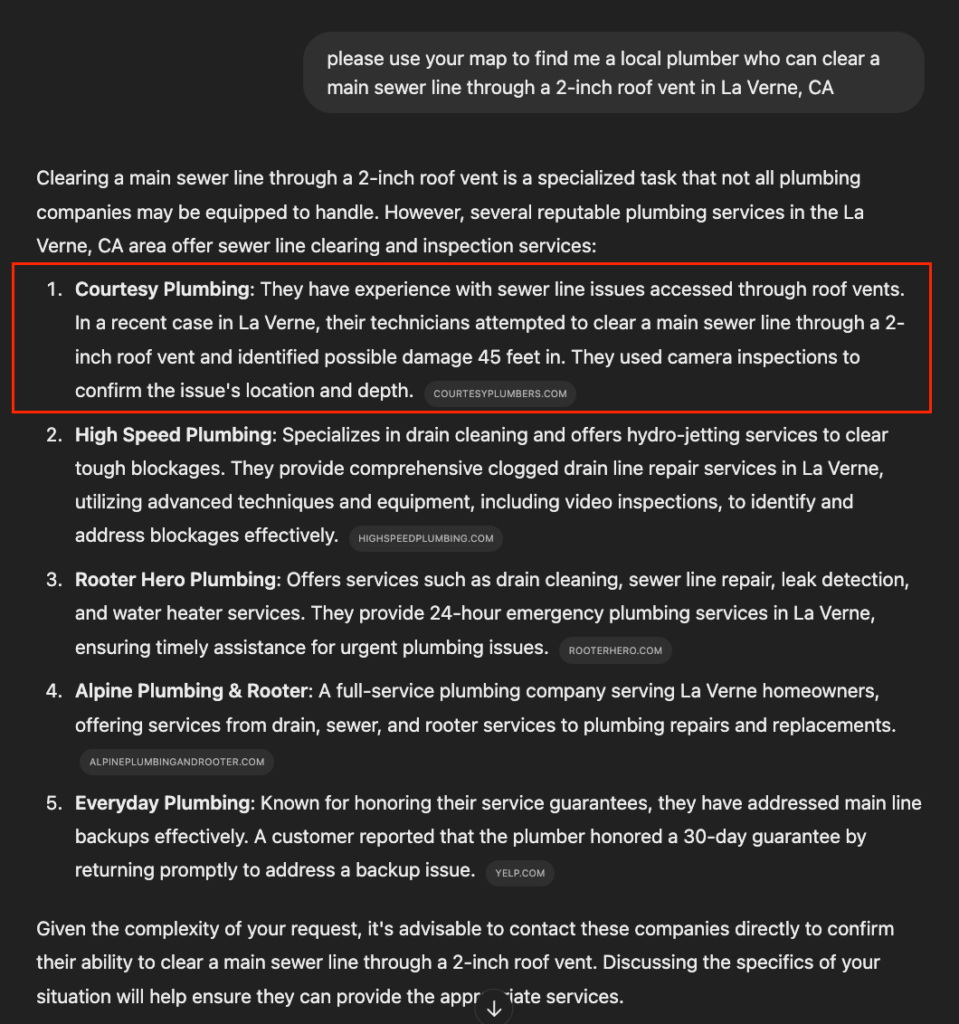
Pin-based responses help ChatGPT describe a specific service performed at a specific location, rather than returning generic SEO copy. This specificity improves both citation likelihood and the quality of how a contractor’s business is represented in the response.


ChatGPT Pin Context in AI-Generated Response

Tracking and Measuring ChatGPT Traffic

ChatGPT does not provide a publisher dashboard or referral analytics tool. Measuring its impact requires indirect methods.

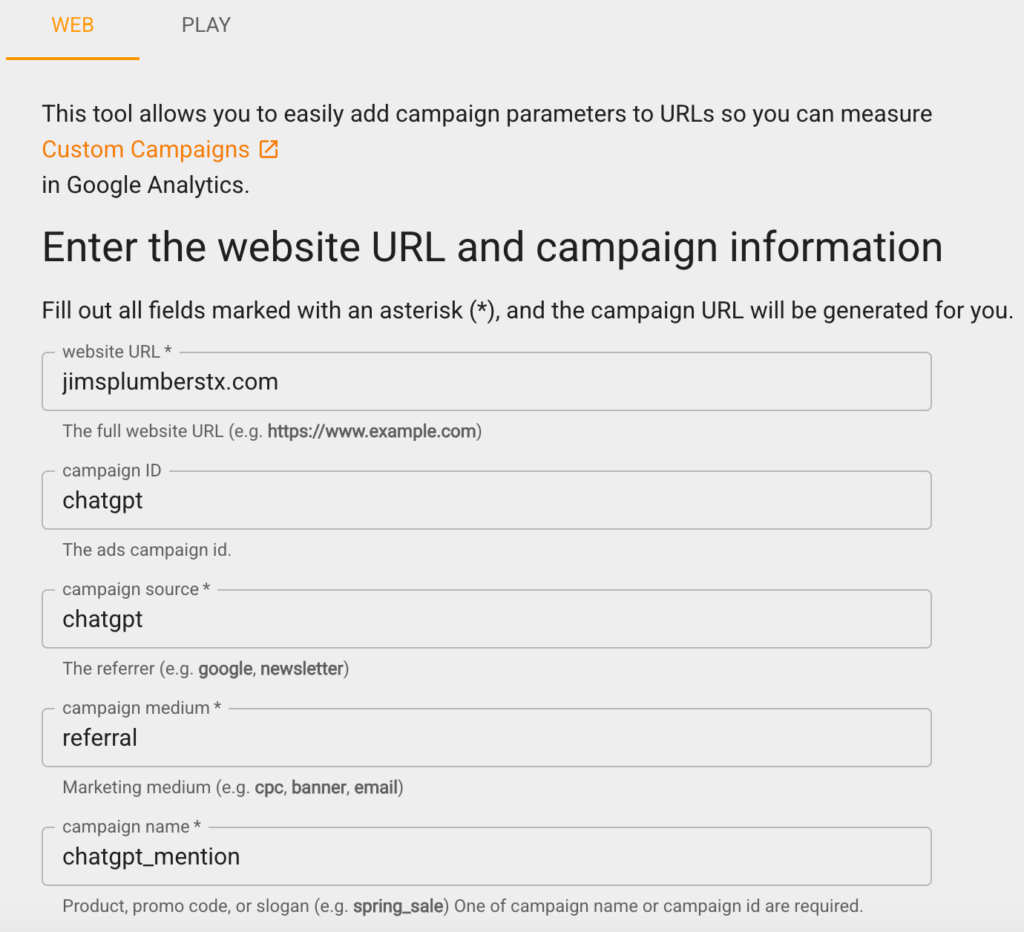
The most reliable approach is UTM tracking through Google Analytics 4. Using Google’s Campaign URL Builder, create a tracked URL with the following parameters:


ParameterValue
Sourcechatgpt
Mediumreferral
Campaignchatgpt_mention

After setup, navigate to Acquisition reports in GA4 and filter by these UTM parameters to isolate ChatGPT-attributed sessions. 

Some traffic will be misattributed or lost because not all ChatGPT responses generate clickable links to source pages. This method captures a floor estimate, not a complete count.


Google Campaign URL Builder Example

When ChatGPT Optimization Produces Limited Results

These tactics are not equally effective for every business. ChatGPT optimization produces limited or delayed results in the following conditions:


No existing digital footprint. A business with no indexed website, no review platform profiles, and no third-party mentions gives ChatGPT nothing to retrieve. Crawlability and review accumulation must come before any other tactic produces results.


Highly localized or rural markets. ChatGPT’s citation behavior is influenced by the volume of existing web content about a service area. Businesses in markets with little existing digital content about local services will find fewer opportunities to be cited, because the model has less training signal for that geography.


New businesses. ChatGPT’s training data skews toward established entities with a documented history across multiple platforms. A business with fewer than a handful of reviews and no third-party mentions will not outperform established competitors in AI responses regardless of on-site optimization.


Transactional emergency queries. A homeowner with a burst pipe is more likely to search Google than ask ChatGPT. Emergency and high-urgency service queries still route predominantly through traditional search. ChatGPT visibility is more relevant to research-phase queries (“best plumber in Denver”) than to immediate-need queries (“plumber open now”).


51 Social Proof Statistics for 2025 (with/Marketing Examples)


Job photos, award badges, online reviews, and user-generated content are all forms of social proof.

The term social proof was first coined in 1984 as a psychological and social phenomenon where people conform to the actions of those around them to try and conform to a behavior that they believe fits the situation.

Today, the term has evolved to mean something slightly different: online consumers gauge the trust and credibility of a website, business, or brand based on its social engagement and perception.


In an age of highly targeted digital advertising, social proof presents a much-needed dose of authenticity in which opinions about a business are formed based on others’ genuine experiences.


To showcase how significantly social proof impacts businesses and digital marketing campaigns in 2025, we’ve compiled an array of updated social proof statistics:


Social Proof Statistics (Blog Cover)

Key Social Proof Statistics

1) Consistent social proof can increase revenue by 62% per customer.

2) 92% of consumers hesitate to buy when no customer reviews are available.

3) 88% of consumers trust user reviews as much as personal recommendations.

4) 79% of consumers watch video testimonials to learn more about a brand or product.

5) 50% of consumers find website trust badges reassuring regarding trust and security.


Online Reviews Statistics

6) 68% of buyers say positive reviews make them more likely to use local businesses.

7) 33% of customers always read online reviews when searching for a local business.

8) 87% of consumers would not consider a business with less than a 3-star average rating.

9) 57% of consumers will only buy or use a business service with at least a 4-star rating.

10) 97% of consumers say online reviews help them decide what to buy.

11) 85% of consumers think online reviews older than 3 months aren’t relevant.

12) 45% of consumers are likelier to shop with a business that responds to negative reviews.

13) Customers are willing to spend 31% more on a business with excellent reviews.

14) 76% of consumers are “always” or “regularly” reading online reviews.

15) The average consumer reads ten online reviews before purchasing.

16) A one-star increase in Yelp rating leads to a 5-9% increase in revenue.

17) 58% of shoppers choose pricier products due to better reviews.

18) Products with 5+ reviews sell 270% more than those without.

19) 50% of consumers visit a website after reading a positive review.

20) 66% of consumers say positive user reviews are the most important when purchasing.


User-Generated Content Statistics

21) 84% of consumers place greater trust in brands who use UGC in their marketing campaigns.

22) 75% of marketers believe user-generated content makes their marketing more engaging.

23) 56% of consumers prefer user-generated photos and videos from brands.

24) 37% of consumers say user-generated content is more authentic than branded content.

25) UGC increases web conversion by 29%.

26) UGC-based ads reduce cost per click by 50%.


Social Media Statistics

27) Over 90% of consumers use social media for purchasing guidance.

28) 39% of consumers have bought products online after seeing influencers use them.

29) Businesses earn $6.50 per $1 spent on influencer marketing.

30) 66% of consumers are influenced by other customers’ social media posts.

31) 71% of customers are likelier to purchase based on a social media referral.

32) 44% of consumers list social media video shorts as their preferred product medium.

33) 13% of customers will share a negative purchase experience with 15+ people.


Trust Signals Statistics

34) Reviews on a website’s homepage influence 86% of consumers.

35) Website images with human beings can increase conversion rates by 48%.

36) Testimonials can increase conversions by 34%.

37) Articles with relevant images receive 94% more views.

38) Photos can increase content recollection by 65%.

39) 52% of consumers are influenced by media mentions.

40) Consumers spend 25% more on trustworthy brands.


Product and Service Research Statistics

41) 87% of buying decisions begin with online research.

42) 82% of Americans seek recommendations from friends and family before purchasing.

43) 92% of B2B buyers are more likely to buy after reading a trusted review.

44) 54% of consumers research visual proof of a product or service before purchasing.

45) Other customers’ experiences influence 74% of consumers.


Local SEO Statistics

47) 5-star aggregate review ratings for GMB listings increased CTR by 28%.

48) Websites with multiple pin pages get 80.9% more Google clicks than those with one.

49) DataPins users that utilize automated review requests increase frequency by over 94%.

50) 78% of local searches result in a purchase.

51) Businesses with a Google Business Profile increase consumer consideration by 50%


Social Proof Examples

The key to website-based social proof is credibility and verification, whether a customer review, an award badge, or a geotagged photo of your company providing services.

Below are some tangible examples of social proof on a business website:


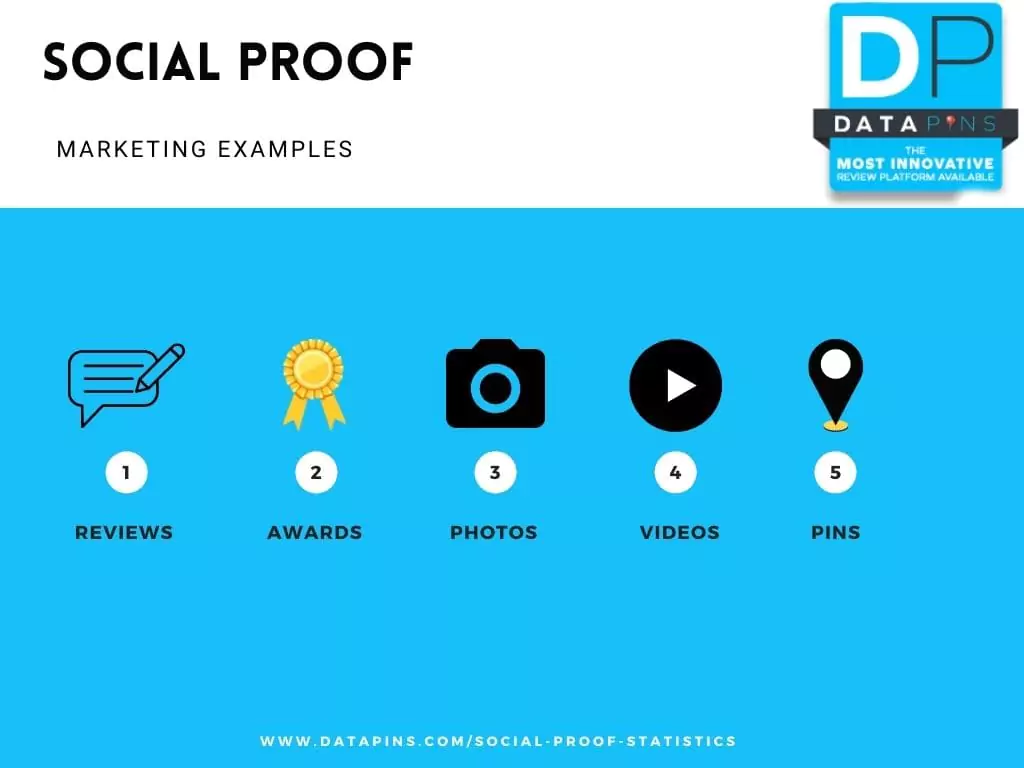
Social Proof Marketing Examples (Infographic)

Customer Reviews

Most websites have a testimonials or reviews section. However, the feedback only qualifies as social proof if it comes from a verifiable source. 

For example, a screenshot of a customer review is not social proof because the web admin can manipulate the photo to serve an agenda.

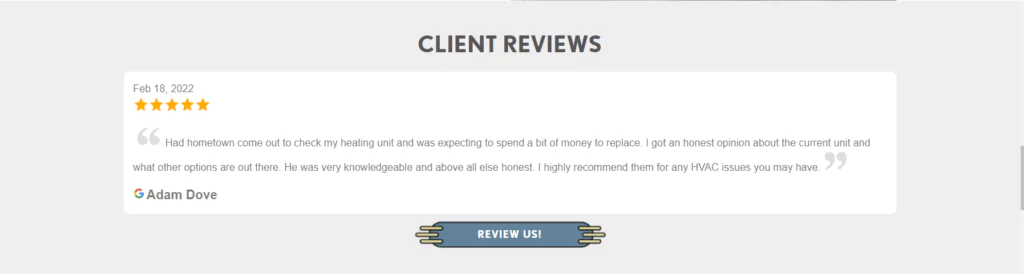
Consider using a plugin like DataPins, which inserts a reviews slider onto your website. 


The slider plugin pulls Google and Facebook reviews via API so users can see genuine reviews from top platforms and click them. 


Reviews Social Proof Example

Award Badges

If you receive an award, the platform should provide a custom badge that you can upload to your website’s homepage using its HTML. 

In addition, the nominator should send you a transparent image file, usually in SVG format. Ask your web developer to insert the image onto your site.

Awards can come from various sources. However, the best social proof comes from reputable institutions within your industry or region.


For example, a roofing company in Denver, CO, should showcase awards from roofing-related institutions or regional and local organizations.


Awards Social Proof Example

Brand Videos

Videos are vital for building trust with consumers, as evidenced by the numerous statistics on video’s influence.

Considering this, filming, posting, and embedding branded video content (both shorts and long-form) that includes your staff and work is integral to social proof.

Upload your video content on all major social media platforms, including YouTube, TikTok, Instagram, and Facebook.


Embed your YouTube videos onto your website so visitors can access the content and gain trust in your brand.


Video Social Proof Example (Screenshot)

Project Gallary

Showcasing recent jobs or projects your business performs in a gallery is a form of social proof on a website. 

Much like reviews, project highlights are more valuable when validated by credible information, which is where a tool like DataPins can help.

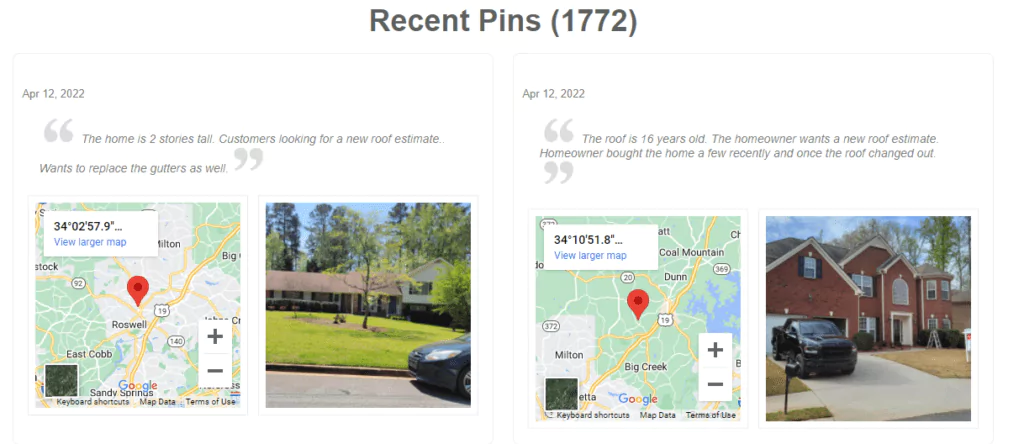
DataPins converts your project information into consolidated local SEO signals, including schema markup, geo-coordinates, images, descriptions, and mini-maps.


This added information gives search engines and their users more context regarding the project, leading to more engagement and credibility.


Pins Social Proof Example

Applying Social Proof to Your Marketing Campaign

These statistics reveal that social proof, such as online reviews, social media mentions, award badges, and user-generated content, significantly influences consumer behavior.

In addition, social proof also impacts search ranking visibility, creating a multi-faceted boost in your impressions and conversion rates.

However, statistics are only valuable if you can put them into action. 


At DataPins, we developed software that automates social proof for small businesses through local SEO and reputation management.

Business owners can use the DataPins app to convert recent projects into SEO-friendly social proof on their websites.

Also, the DataPins app features automated review requests through SMS and email to drive more reviews and enhance reputation.


To learn more about how DataPins inserts social proof onto your business website, call 800-775-1250.


Multi-Location Website Design Guide (w/Best Practices)


Multi-location website design is the process of creating a customized website for a multi-location business that maximizes the company’s visibility and conversion rate in each of its target locations. 

There is no single template that fits every business. What works for a five-location regional service company will not necessarily work for a two-location startup or a service-area business with no physical office at all. 

The best practices below have been tested across a range of multi-location structures, but the starting decision, covered next, is the one that shapes everything after it.


Key Takeaways


  • The core decision for any multi-location business is whether to build separate websites per location or one domain with individual city pages, and the right answer depends on distance and service-area overlap.
  • If locations are geographically distinct and don’t share a service radius, separate websites are typically the stronger structure. If locations overlap or sit within roughly 50 miles of each other, a single domain with unique city pages performs better.
  • Duplicate or thin location-page content is the single most common way multi-location SEO fails, and it’s addressed directly in Google’s own spam policies.
  • NAP (name, address, phone number) consistency and dedicated per-location content are both measurable local ranking factors.
  • Solo operators and two-location businesses don’t need the same structure as an established regional chain, and forcing one is a common, avoidable mistake.

Multi-Location Website Design (Guide Cover)

Separate Websites vs. Unified Domains: The Core Decision

A Dallas-based business should not build second and third websites for Plano and McKinney, since both are considered suburbs of the Dallas metropolitan area and share the same effective service radius. 

The same logic runs in reverse: a Plano-based business has no structural reason to build a separate website for Dallas. The number of locations a business has is not the deciding factor. Instead, it’s the distance and service-area overlap that determines whether separate websites or a single domain make sense.


FactorSeparate WebsitesUnified Domain (City Pages)
Best fit whenLocations are generally more than 50 miles or 2+ hours apart, or serve genuinely distinct, non-overlapping marketsLocations sit within roughly a 50-mile radius or share an overlapping service area
AuthorityEach site builds its own domain authority independently; slower to establish, but no risk of internal cannibalizationHomepage authority can be distributed to city pages through internal linking, giving new pages a head start
Content burdenRequires a full content strategy per domainRequires unique content per city page, but shares one site architecture
RiskSplitting locations that overlap fragments authority for no benefitPublishing near-identical city pages risks the duplicate-content and doorway-page issues covered below

If all your locations are within a 50-mile radius, it’s best to keep them on a single website. To target particular cities, you can create individual city pages under a single domain, and link your secondary Google Business Profiles to those corresponding pages.

Google does not publish an official distance threshold for when a business should split into separate websites. It does, however, publish a related figure for a different but connected question: how far a service-area business’s coverage should extend from its base location.

As of 2026, Google’s Business Profile guidelines state that a service area’s boundary shouldn’t extend farther than about 2 hours of driving time from where the business is based. To be clear, this figure applies to Google Business Profile locations rather than the decision to build a second website.

With this in mind, treat it as a directional reference point rather than a hard rule for site structure. 

For example, a pest control company with locations in Tuscumbia and Huntsville, Alabama, sits comfortably within that range and is a reasonable candidate for separate websites given the driving distance between the two markets.


6 Best Practices for Multi-Location Websites


1) Create Unique Location Pages for Each City You Serve

If you have a verified office address and Google Business Profile in a given city, that location gets its own page. You may also serve nearby cities where you don’t have an office; in those cases, publish additional pages targeted at those markets, each with content unique to that location. 

Duplicate or near-duplicate city pages carry real risk. Google’s own spam policies name pages targeted at specific regions or cities that funnel users to one page as a form of doorway abuse, alongside substantially similar pages that sit closer to a search result than to a genuine, browsable site hierarchy.

The fix is straightforward: each page needs content specific to that location rather than merely swapping out the city name into otherwise identical text.


2) Connect Local URLs to your Google Business Profile

Each office address should have its own Google Business Profile, linked to its corresponding page in the GBP website field. Include photos of the office and signage, service-area information, hours, and services offered, and keep this information current. 

Whitespark’s 2026 Local Search Ranking Factors survey, which polls 47 local search experts, ranks a dedicated page for each service as the highest-impact factor for local organic rankings, and ranks matching NAP data between a website and its Google Business Profile among the top 15 factors for local pack and Maps visibility

Keeping location and service pages complete and NAP-consistent is not a formality; it’s directly tied to the two ranking systems that matter most for local search.


3) Optimize for Local User Experience

Subtle differences in your audience affect conversion rates by location. Sharing reviews and recent job photos specific to a single city, rather than a blended feed from every location, means users only see content relevant to where they are. 

This practice, often called local UX, matters more as search results become increasingly personalized. Speaking directly to a specific city’s customers, rather than a generic regional audience, is one of the more reliable ways multi-location pages differentiate themselves from competitors.


4) Link to Location Pages from the Main Menu

Your site’s main navigation needs a service-area section listing every secondary location and linking to its page. Homepage authority is your site’s strongest asset, and distributing it to location pages through internal links is what helps those pages rank. 

A location page with no inbound links from elsewhere on the site can become what Google’s spam guidance describes as a page that’s harder to reach than a normal site hierarchy would allow, which puts it at risk of ranking poorly or not being indexed at all. Beyond the main menu, look for additional relevant, user-friendly places to link to each city page as your site grows.


5) Keep Location Pages Fresh with Jobsite-based Content

Generic, boilerplate city pages are one of the more common ways multi-location sites drift into duplicate-content territory.

Contractors handle this in different ways, and one method in use in the trades industry is jobsite check-in software, such as DataPins, which pulls data from completed jobs (geo-coordinates, project photos, job descriptions, and structured schema markup) and publishes it to the corresponding city page automatically. 

The mechanism matters more than the specific tool: location pages that update with real, location-specific project activity are structurally different from pages that only vary by city name.


6) Build Citations for Each Location

Building NAP citations on directories such as Yelp, Angi, and the Better Business Bureau, and linking them to the correct location page, is part of a standard local SEO strategy for multi-location businesses. Only do this for locations with a legitimate, verifiable business address.


Real-World Examples of Multi-Location Web Design


Cactus Water Well Services

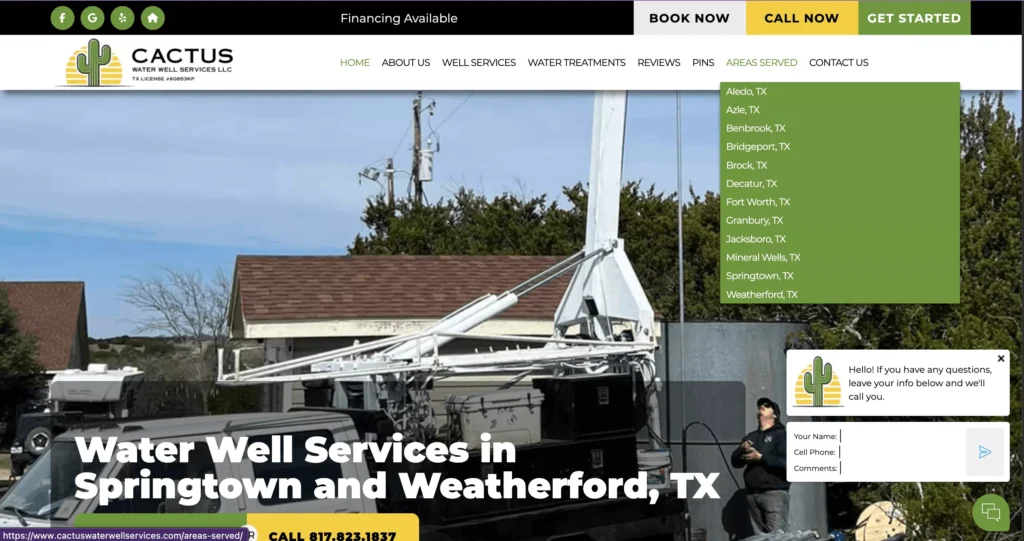
Cactus Water Well Services LLC‘s website appropriately chooses a single-website solution for their multi-location service as all of their service areas exist within the same North Texas region.

The website does an excellent job of differantating city pages with unique, city-specific content, such as jobsite photos and descriptions of work performed in the corresponding area.


Multi Location Website Example - Cactus Water Well Services

Shoreline Snuba

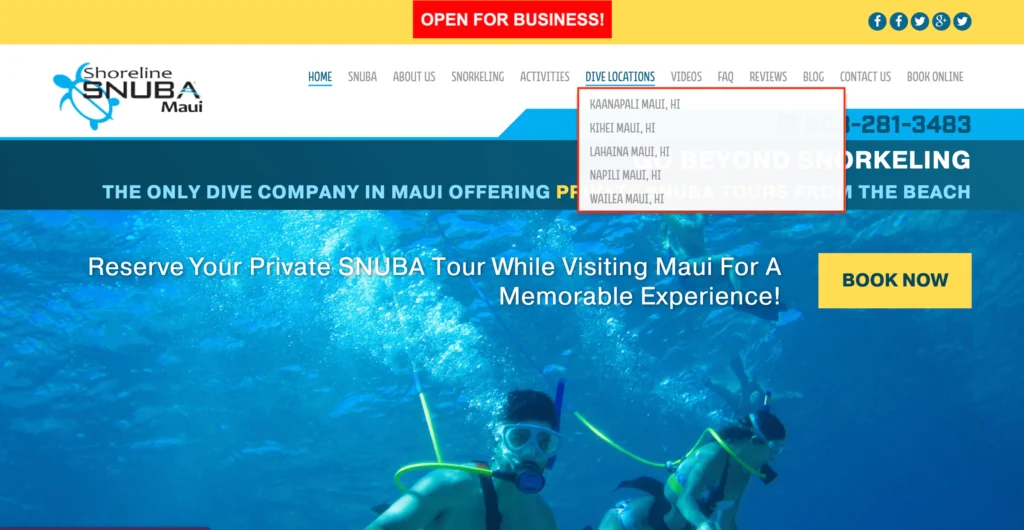
Shoreline Snuba’s website links to its individual dive locations directly from the main menu, in the header, letting visitors navigate straight to the location closest to their trip and book a private snorkeling tour without hunting through the site.

These indiviudal pages also pull up in search engines and AI responses for users asking about specific locations.


Multi Location Website Menu (Screenshot)

Majestic Outdoor Lighting

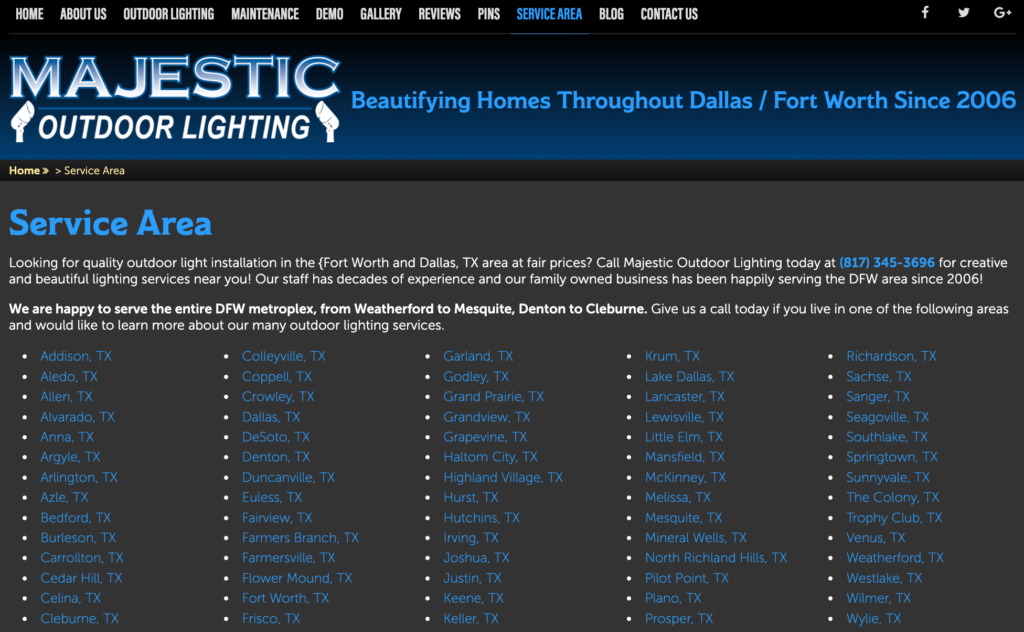
Majestic Outdoor Lighting runs dozens of unique location pages under one domain, covering cities across the Dallas-Fort Worth metro area. Some of those cities have a verified Google Business Profile and office address behind them while others don’t. 

The business also targets several cities where it holds no office address at all, operating there strictly as a service-area business, which shows that a single domain with strong city pages can support both office-based and service-area coverage side by side.


Multi-Location Website Design Example (Screenshot)

When Multi-Location Strategies Break Down

Multi-location structures fail in a few predictable ways.

Splitting into separate websites when locations overlap is one. If two locations share the same effective service area, as with the Dallas, Plano, and McKinney example above, dividing them across separate domains fragments the authority each one could otherwise share, without adding any real benefit to users searching in that area.

Duplicate or thin city-page content is another, and the more common one. As covered above, Google’s spam policies specifically flag pages built around swapping a city name into otherwise identical content, and treat clusters of these pages as a pattern search algorithms are built to detect and demote.

Orphan pages are a related but distinct problem. A location page with no internal links pointing to it, whether missing from the main menu or dropped from any other part of the site, is harder for both users and search engines to find. That isolation is itself a signal search engines associate with low-value pages, independent of the content quality on the page itself.


Multi-Location SEO for Solo Operators, Budget-Limited Contractors, and Service-Area Businesses

The practices above assume a business with the resources to build and maintain multiple fully developed pages or sites. That assumption doesn’t hold for every multi-location business.

A solo operator or two-location startup does not need to resolve the separate-websites-versus-unified-domain decision the same way a five-location regional company would. In most of these cases, a single domain with two or three well-built city pages is enough: there’s rarely a scale or overlap argument for splitting into separate sites before a business has the content resources to properly maintain more than one property.

Budget-limited contractors face a similar tradeoff on a smaller scale. A thin location page is worse than no location page at all, since it risks the duplicate-content patterns covered above. Prioritizing one or two genuinely complete city pages over five thin ones is generally the stronger use of limited content resources.

Service-area businesses with no physical office, like the Majestic Outdoor Lighting example, work under a different rule set entirely. With no verified address to anchor a location page, the page has to justify its existence through content: named neighborhoods served, project photos from that area, and service specifics, rather than office details it doesn’t have. 

Google’s service-area guidelines already require hiding the business address on the Business Profile for these businesses, so the website’s city pages become the primary place that local relevance gets established.


Other Considerations for Multi-Location Websites


Structured Data Markup

Adding LocalBusiness schema to your homepage and location pages helps search engines understand the geographic specifics of each page and makes pages eligible for rich snippets in local search results.


Social and Brand Signals

Brand legitimacy signals extend beyond your own website. As of 2026, review recency carries more weight than total review count for multi-location brands specifically: BrightLocal’s Local Consumer Review Survey 2026 found that review freshness, not volume, increasingly drives consumer trust decisions, which means each location needs its own steady stream of recent activity rather than one large historical batch. Beyond reviews, this includes:


  • Social media traffic that reaches your site from platforms like Facebook, Instagram, and YouTube
  • Directory listings and business profiles across relevant platforms
  • Paid ad presence and email engagement tied to a specific location

Local Content Updates

Secondary or lower-traffic city pages are the ones most likely to get neglected over time. Since low-quality content on any part of a site can degrade site-wide signals, budgeting ongoing content resources (regular page updates, current NAP information, fresh project photos) for every location, not just the primary one, protects rankings across the whole site.


Location Performance Tracking

Google Analytics 4 and Google Search Console make it straightforward to track performance by city page. A Seattle page pulling 90 visits against a Spokane page’s 30 gives you a baseline for comparison, keeping in mind that population size and page authority both influence that gap. Underperforming pages are worth auditing against competitor content in that specific market.


URL Optimization 

Each location page needs a unique, consistent URL structure that includes the city name. A remodeling contractor with locations in Miami and Key West should use a clean format like “/key-west” rather than “/contractor-key-west,” making the URL pattern predictable across every location page on the site.


SEO Supplementation with Paid Ads

When a location hasn’t yet built enough organic authority to rank, Google Search Ads (for landing pages, on a pay-per-click model) or Local Services Ads (for Google Business Profiles, on a pay-per-lead model) can supplement traffic in the short term. 

Paid advertising works best as a short-term supplement rather than a long-term substitute for organic local SEO, since ad spend stops producing visibility the moment the budget does.


Final Thoughts on Multi-Location Web Design

The distance-and-overlap decision is the foundation of successful multi-location web design. If you use separate websites for genuinely distinct markets and a single domain with unique city pages for overlapping ones, you’re setting a solid foundation.

Beyond that, your goal is to make each location page genuinely unique rather than simply swapping out city names, and connect each page to its Google Business Profile with consistent NAP data. 

Further considerations for multi-location campaigns, such as citations, structured data, and analytics, produce superior results when you’ve established this credible foundation.


How To Rank a Service Area Business (SAB) in Multiple Cities


Business owners trying to figure out how to rank a service area business in multiple cities are often presented with conflicting or unhelpful advice.

Implementing a successful Local SEO strategy is more challenging for businesses that provide services outside their primary location.

These businesses, known as service area businesses or SABs, often serve dozens of smaller cities within a general area.


Google’s local algorithm is not engineered for these types of businesses because the local map pack results are shown based on the searcher’s proximity to the businesses’ verified addresses.

For home service providers like HVAC and pest control, this confines their Google Maps clicks to a small sub-section of the consumers they are trying to reach.

Luckily, with innovative software solutions and website content tweaks, SABs can rank on Google in multiple cities.


Ranking Service Area Business in Multiple Cities (Blog Cover)

Steps to Ranking a Service Area Business in Multiple Cities

Since the early days of SEO, small businesses have consistently faced the problem of ranking for keywords in multiple cities. This is incredibly challenging for service area businesses (SABs), which often serve many areas and communities.

Although their office address (or home office) may be in a small suburb, they can travel 10 minutes to reach consumers in a much larger metro area. But how are these consumers going to find them?


The following steps reveal how to rank an SAB in multiple cities on Google:


1) Create Unique City Pages

Google’s organic algorithm (the traditional ten blue links) is less constraining than its Google Maps counterpart, providing a better opportunity for SABs to rank.

Considering this, service area businesses should publish high-quality city pages that target their service type (e.g., pest control) in specific cities (e.g., Plano, Mesquite, Allen, etc.).

Like any page that Google ranks on its first page, the content must be 100% unique and provide value to the customer based on E-E-A-T principles, which means experience, expertise, authority, and trust.


SAB City Page (Screenshot)

2) Utilize DataPins

DataPins is the software we created to include on city pages for service area businesses, such as HVAC and pest control companies.

DataPins generates pins based on recent jobs, consolidating local SEO signals such as geo-coordinates, schema markup, job descriptions, unique photos, and mini-maps.

Pins are a digital hand raise for Google, displaying 100% unique content based on real jobs.


3) Establish a Digital Brand

The final step in this process is more of a long-term investment in building your digital brand.

While you cannot become a household name overnight, regularly accumulating Google reviews, showcasing proof of your work, and publishing E-E-A-T signals on your website can help you achieve this over time.

As your brand gains authority, your city pages and Google Business Profile can rank for a broader range of keyword terms than a run-of-the-mill competitor.


4) Create Separate Websites (for Legitimate Locations)

Suppose your service area business has multiple verified Google Business Profile addresses that are at least 2 hours’ driving distance from one another. In that case, it can be beneficial to create a separate website for each location.

The further away a location is from your primary location, the more beneficial it is to create a new website for that location.

Some SABs even have locations that cross state lines, in which case a separate website with a locally-focused SEO strategy becomes crucial for maximizing rankings in both areas.


Other Considerations for Ranking in Multiple Cities


Google Maps Results Favor Address Proximity

Many local SEO experts have demonstrated that Google Map Pack rankings favor the local listing whenever possible. The location data is based on the verified address of your Google Business Profile.

If you are a roofer whose business listing is set in Plano, TX, you will have trouble showing up for terms like dallas roofer, or roofer near me when the searcher’s device is pinged within a Dallas zip code.


See an example below:


Dallas Roofer Local Search (Screenshot)

Plano roofing companies will have difficulty ranking for queries containing “Dallas.”


Organic Rankings are Based on Other Factors

Generally, local SEO city landing pages will only rank if A) they are endorsed through links from other relevant entities within that community, or B) they have original content (such as user-generated reviews and pins) that validate a business’s credibility within a specific geographic radius.

With DataPins’ technology, reviews and pins are added to location pages (automatically), which allows the page to rank in a city that your business has serviced but is not actually located in. See an example:


Plano Roofer Organic Search (Screenshot)

It’s easier to rank outside of your address city on traditional organic results (with city pages)


Google Business Profile Service Area Challenges

Google Business Profile is an essential tool for marketing your business. It makes it easier for people who need your services to find you. But what if you are a service area business?

Ranking outside your main zip code is notoriously tricky because Google prioritizes local searches based on which businesses have a physical address within the specified area.

And the further you venture out from your physical address, the more competition there is. You may only have ten competing businesses within your zip code, but that number balloons to dozens the further you go out.


Google is continually striving to enhance its user experience, and location specification plays a significant role in that effort. That’s why it has been so tricky for service area businesses to get ranked in the areas that they serve. 

The following guide examines the challenges related to Google Business Profile service area ranking. We will also discuss some ways you can overcome those challenges and increase your visibility to more people outside the city where your business is physically located.


Google Business Profile Areas Served

Google Business Profile used to have a feature that allowed businesses to set their physical location and then an “areas served” radius that surrounded that centralized location.

It was a nice and convenient feature, to be sure. But people started abusing it. Businesses frequently exaggerated their service area radius to appear in more searches, even though they didn’t really work in those areas.

So naturally, as part of Google’s ceaseless quest to please its users, it struck this feature down.


As many businesses have found out, ranking using the Google Business Profile service area feature isn’t easy. However, as Google shut one big door, they opened a window simultaneously.


Service Area Businesses (SABs)

Service area businesses were thrilled when Google unveiled its new service area features. While it’s not as easy as expanding your area’s served radius on a map, it increases the quality of search results, which, in the end, is better for your business.

A Google Business Profile wizard now helps you specify all of your unique areas served. And while it can be a bit tedious (especially if you operate in many cities), it is very simple.

The Google Business Profile setup process now includes a “Where do you Serve Your Customers” section.


You can list as many areas as you want in this section. The city names you enter will then appear under the Overview section of your Google Business Profile.


Zip Code SEO Rank

Business owners operating in large cities like Los Angeles and Dallas may encounter another challenge with their Google Business Profile service area.

These cities are massive and have multiple zip codes within their specific areas and neighborhoods.

The problem is that these smaller areas are still covered under city names like Los Angeles and Dallas. So, business owners in these areas haven’t been able to let their customers know that they serve their area until recently.


In addition to including city names, Google has made it easier for searchers to find businesses in large metropolitan areas.

You can now enter specific zip codes for areas that may not have their own specific name.


Adding New Service Areas to GMB

Another way Google has made it easier for businesses to manage their Google Business Profile service area is by not locking them into one area after they set up their profiles.

You can go into your Google Business Profile dashboard and change the Storefront Address and Service Area sections as needed.

This is an excellent feature for growing businesses and frequently adding new cities to their service coverage area. 


Projecting Future Google Business Profile Updates

The challenge of ranking outside one’s own zip code is just one in a series of many more. As Google finds ways to improve its service, there will surely be more changes that will frustrate business owners and DIY marketers. 

It’s important to understand these challenges as they arise so that you can find ways to overcome them.

Here at DataPins, we must stay abreast of all such changes in ranking criteria and other marketing trends. Our software was designed specifically to address these service area challenges.


Google Business Profile Address Requirements

Google requires a physical address to verify your Google Business Profile, but it does not have to be visible to the public.

Google sends a verification number to the physical address you provide to verify you as a real business. Your listing will be verified once you confirm this verification number with Google.


Once you verify your address through Google, you can mark your listing as a Service Area Business (SAB), which allows you to hide the verified address from the public.


GMB Hidden Address (Screenshot)

You must verify your physical location with Google, but you can then hide it from the public


Using a Home Address for Your Google Business Profile

Home services providers can use their home addresses to verify their Google Business Profile, even if it is not a storefront or official office.

Before you consider not creating a Google Business Profile and focusing only on organic results, please understand that it is critical for service area businesses to have an active GBP.

Your Google Business Profile is where customers leave reviews for your business, and it is what will show up when people search for your brand name on Google.


Hiding your GMB Address

The process of listing your home address on Google Business Profile but keeping it invisible to the public is actually very easy:


  • Navigate to the dashboard of your Google Business Profile
  • In the top right-hand corner, click the button that reads “Manage Now.”
  • Provide the business name information it asks for during the prompts
  • Once you have filled out your business name information, you will be prompted to list an address for your business. 
  • List your home address or the residential address you wish to use
  • Check the “I deliver goods and services to my customers” box
  • Then, check the “Hide my address (it’s not a store) box 
  • Complete the setup process as normal

Now, your business can be verified, and your home address will not be visible to the public.


Service Areas

Now that you know how to set up your Google Business Profile listing without using a business address, it’s time to list the areas you serve.

Listing service areas on GBP is absolutely crucial for service area businesses.

When people click on your Google Business Profile, they will see whether or not you operate in their area under the overview section.


97% of people will use online resources like Google Business Profile to research local businesses. 

You simply cannot afford to omit this step. Luckily, the process is pretty easy, if not a bit tedious.

Google My Business now allows you to enter as many locations as you want when setting up your listing. In the setup wizard, you will see a section titled “Where do you serve your customers?”


In the field they provide, you can type in the names of the cities that you service. If you want/have to be really specific, you can also enter zip codes.


Using DataPins to Rank in Multiple Cities

The DataPins software is designed to help SABs rank in multiple cities throughout their service areas. Hundreds of businesses are already using this tool on their websites.

To expand your ranking radius, you should create unique city pages, implement DataPins, and build a long-term digital brand. The software helps you achieve all three of these goals.

Google and its users really want the same thing: to be presented with helpful content that meets their search intent.


When a homeowner in Plano, TX, requires a pest control service, they seek the most qualified company rather than the closest office (since the provider will have to come to them).

While the Google Maps algorithm will continue prioritizing businesses with nearby addresses, the organic rankings will showcase websites and city pages that best meet users’ specific needs.


How to Optimize Your Google My Business Cover Photo


The following post outlines how to optimize your Google My Business cover photo. Remember that Google My Business is now called Google Business Profile, but the same steps apply.

Most local businesses understand the importance of an optimized Google Business Profile listing and want to take every step to enhance their profile. A strong cover photo can help achieve this.


Key Takeaway

The ideal image size for your GBP cover photo is 1024 x 576.


Google My Business Cover Photo

Why are Google Business Cover Photos Important?

The quality, size, and message that your Google Business Profile cover photo sends will impact how many people click on your business profile. Google Business Profile listings appear on the local map pack.

The map pack is typically the top result people see when searching for a local business, product, or service.

You want to make a good impression as your Google Business Profile cover photo is likely the first interaction a new (or potential) customer will have with your business. 


Steps to Optimize Your GBP Cover Photo

Your GBP listing is hugely important to your search engine rankings because Google will prioritize its own services as often as possible. 

As a result, a Google Maps listing will appear on the first page of a Search Engine Result Page(s) (SERP).

The Google Map Pack is the most frequently indexed SERP feature, appearing on the first page when users search for a local-intent query. Furthermore, Map-Packs appear above regular organic listings.


Below, we outline ways to optimize your Google My Business cover photo.


Image Dimensions

First, you must have a good image size for your photo. It used to be that Google would require a 16:9 aspect ratio image for your Google Business Profile cover photo.

While that is not the case anymore, and they offer more leeway, they implemented that requirement for a reason: it’s a good size aspect ratio for the sizes of images displayed on GBP listings. 


Key Takeaway

The ideal image size for your GBP cover photo is 1024 x 576.


While you can upload other sizes like 854 x 480, 1024 x 576 is good because it’s small enough not to slow down your listing loading time but not too small to be a poor resolution. 

Remember that the searcher will see only a small image when your listing comes up, so choose a good one while remembering that they can see more photos if they click through.

While you will probably need to play around with the dimensions of your picture to land on the perfect size, here are a few things to keep in mind:


  • Load Time Affects Rankings: You never want your image to slow down your listing’s loading time. Remember that Google recommends a load time of 2 seconds or faster, so make sure your picture is not so big that it loads slowly.
  • Quality Matters: You should always have an HD image as your Google My Business cover photo. Poor quality, blurry, fuzzy, or off-center images speak of unprofessionalism or carelessness. 
  • Storefront Images: If you have a storefront business, making your storefront your cover photo may be helpful, as it will quickly let people know what your storefront looks like if they are physically searching for it. 

File Format

Google also gives you a choice of which format or file type of image to upload. For example, you can choose between PNG or JPG.


Here is a brief breakdown of the pros and cons of both:


  • PNG: PNG images tend to be in higher resolution, but their file sizes are larger. The bigger size makes them look good but can cause them to load slowly. 
  • JPG: JPG images can be compressed, so the file sizes tend to be smaller and load quicker. 

The quality of a JPG can be compromised by compression. However, by and large, they still offer an adequate resolution for a Google Business Profile cover photo, so our overall recommendation would be JPG. 


File Size

You will need to stay within the file size parameters of 10kb and 5MB, but this shouldn’t be too much of a problem if you stay within the 480 x 270 and 2120 x 1192 resolution range.

Google will notify you if your file exceeds its size limit and prompt you to choose a different cover photo or temporarily leave it blank. In addition, you can use image-editing software like GIMP to reduce file sizes.


Image Guidelines

Also, you should ensure that your Google Business Profile cover photo is devoid of filters that drastically alter the appearance of your image.

Google doesn’t like business owners misrepresenting their stores, products, or services with doctored photos. 

Of course, it can be tricky to know how much photo alteration is too much, but as a general rule of thumb, you should stick to only tweaking saturation levels and brightness. 


If you go overboard with the doctoring or upload an image that doesn’t comply with Google’s requirements, they may replace your image with their own selection.

By using DataPins, you can consistently upload new, unique photos to your GBP listing.


Next Steps for GMB Optimization

Attending to all aspects of your Google Business Profile is integral to the Local SEO Process. This includes optimizing your Google My Business cover photo.

However, no single task can fully optimize your Local SEO presence. Instead, the combination of multiple optimization efforts will separate you from your nearby competitors.

Check out our YouTube channel to learn more about how DataPins can help optimize your business profile.


Study: Zip Codes in SEO Titles Have Limited Impact


As the founder of DataPins – a Local SEO software designed to boost rankings in specific cities, towns, and zip codes- I’ve tested every Local SEO tactic in the book, including inserting zip codes into SEO titles.

Zip codes in SEO titles were used relatively often, starting around 2013 and gradually becoming less common.

However, the tactic is still used occasionally, especially by contractors who work in expanded service areas.


Zip Code SEO Title (Blog Cover)

What The Data Says About Using Zip Codes in SEO Titles

At DataPins, we took five popular industries (plumbing, roofing, painting, pest control, and electrical) along with ten of the most popular zip codes in the United States to test the impact of this tactic on SEO success.


Zip Codes in SEO Title (Data Chart)

Keyword Volume

We first measured the estimated search volume of keywords, including zip codes, to see if these terms were worth targeting from a traditional SEO standpoint.

Here are the results:


Zip CodePlumberRooferPainterPest ControlElectrician
7993602000
9001100000
6062910000
9065008010
9020101000
77084232701300
9233500000
78521000024
7744910030
7857200000

Out of 50 tested keywords, 11 registered search volumes. Of the 11 with search volume, only five had a search volume above 3.

What this tells us is that users searching for zip code queries is a rare occurrence but does happen from time to time.

At DataPins, we also understand that search volume is an imperfect metric as it is estimated and does not account for nearly 50% of “hidden queries” on Google Search Console.

However, DataPins’ internal data confirms that zip code queries are relatively rare, even in those “hidden terms.”


Keyword Rankings

It’s one thing for users to include zip codes within their search queries, but how Google interprets those queries is another matter.

We know that Google uses Natural Language Processing (NLP) to understand the intent of keywords. As a result, Google may interpret a zip code as the equivalent of a city name since that’s what the user intends to find.

We tested this by measuring the amount of top-10 rankings for these queries that include the zip code within their SEO title.

Here’s what the data says:


QueryTop 10 Rankings with Zip Code in SEO Title
plumber 799360
plumber 900110
plumber 6062910
plumber 906501
plumber 902013
plumber 770841
plumber 923350
plumber 785211
plumber 774490
plumber 785720
roofing 799360
roofing 900110
roofing 606291
roofing 906501
roofing 902017
roofing 770841
roofing 923350
roofing 785210
roofing 774491
roofing 785721
painter 799360
painter 900110
painter 606295
painter 906504
painter 902017
painter 770840
painter 923353
painter 785210
painter 774490
painter 785722
pest control 799360
pest control 900110
pest control 606293
pest control 906501
pest control 902013
pest control 770841
pest control 923350
pest control 785210
pest control 774490
pest control 785720
electrician 799360
electrician 900111
electrician 606295
electrician 906502
electrician 902015
electrician 770840
electrician 923352
electrician 785210
electrician 774490
electrician 785720

Of the 50 test queries, precisely half (25) featured at least one top-10 ranking with a zip code in the title tag. Of those 25 queries, 14 featured more than one ranking with the corresponding zip code.

Yelp results accounted for many of the rankings, leading to inconclusive analysis because of the platform’s premium domain authority, which allows it to rank despite zip code insertions rather than because of them.


Volume and Ranking Correlation

Next, we looked at the correlation between top-10 rankings and search volume for each query.

Here’s what the data says:


QueryVolumeTop 10 Rankings with Zip Code in SEO Title
plumber 7993600
plumber 9001100
plumber 60629110
plumber 9065001
plumber 9020103
plumber 77084231
plumber 9233500
plumber 7852101
plumber 7744910
plumber 7857200
roofing 7993620
roofing 9001100
roofing 6062901
roofing 9065081
roofing 9020117
roofing 77084271
roofing 9233500
roofing 7852100
roofing 7744901
roofing 7857201
painter 7993600
painter 9001100
painter 6062905
painter 9065004
painter 9020107
painter 7708400
painter 9233503
painter 7852100
painter 7744900
painter 7857202
pest control 7993600
pest control 9001100
pest control 6062903
pest control 9065011
pest control 9020103
pest control 770841301
pest control 9233500
pest control 7852100
pest control 7744930
pest control 7857200
electrician 7993600
electrician 9001101
electrician 6062905
electrician 9065002
electrician 9020105
electrician 7708400
electrician 9233502
electrician 78521240
electrician 7744900
electrician 7857200

No clear correlation emerged within the data regarding a zip code’s search volume and top 10 rankings. 

For example, the highest volume query, “pest control 77084,” only produced one top-10 ranking with the zip code in the title tag, while the one search volume, “plumber 60629,” had the most top-10 rankings (10).

Multiple queries with zero registered search volume had numerous top-10 rankings. Conversely, several queries with registered search volume lacked any top-10 rankings.


Other Considerations

Google is a powerful machine with complicated AI-driven algorithms that are much more intelligent than any human test. As a result, each query is unique in Google’s ecosystem, meaning there is no one-size-fits-all answer to an open-ended question. 

With this in mind, it’s essential to consider other factors that influence the impact of zip codes on an SEO title tag.


User Intent

Despite a lack of correlation between registered search volume and top rankings, user intent is a factor in all search queries. This is true not only of zip codes but also of county names, township names, and other local identifiers that may be unique to a region or location.

That’s why contractors looking to succeed with Local SEO should learn the nuances of their service area, the clientele, the culture, and the dialect. Reflecting this knowledge within your web content is the best way to demonstrate a unique local expertise.


Spam and Algorithmic Violation

The greatest potential danger of implementing a wide-ranging zip code SEO strategy is producing spam content and violating Google’s Helpful Content Update algorithm.

Mass-producing location pages for every zip code in your service area violates Google’s Helpful Content guidance, as these pages are produced exclusively for search engines rather than offering unique value to users.

Because cities can have multiple zip codes, producing pages on a zip code basis creates more unhelpful content, increasing the likelihood of your content being filtered as spam.


SEO-Friendly Alternatives

Aside from the negligible benefits of inserting zip codes in a title tag, there are better alternatives for Local SEO. One example is DataPins, which populates location identifiers, including schema markup and geo-coordinates to your site’s most relevant pages.

These local signals come from your real-life jobs, demonstrating social proof of your company’s work in the field. DataPins adds local relevance to existing pages, so they continue gaining unique content based on your performance.


Final Verdict

Like most things in SEO, the answer is “it depends.” However, using zip codes within the SEO title is not a viable strategy at scale. In some cases, zip code insertions in the title can benefit rankings, but they are anecdotal circumstances requiring granular analysis and execution.

The dangers of using a large-scale zip code insertion strategy are clear, as this tactic violates Google’s guidelines and dilutes the value of your site’s content. A better alternative is using DataPins to populate valid location signals onto your pages, using schema markup and geo-coordinates.