Multi-location website design is the process of creating a customized website for a multi-location business that maximizes the company’s visibility and conversion rate in each of its target locations.
There is no single template that fits every business. What works for a five-location regional service company will not necessarily work for a two-location startup or a service-area business with no physical office at all.
The best practices below have been tested across a range of multi-location structures, but the starting decision, covered next, is the one that shapes everything after it.
Key Takeaways
- The core decision for any multi-location business is whether to build separate websites per location or one domain with individual city pages, and the right answer depends on distance and service-area overlap.
- If locations are geographically distinct and don’t share a service radius, separate websites are typically the stronger structure. If locations overlap or sit within roughly 50 miles of each other, a single domain with unique city pages performs better.
- Duplicate or thin location-page content is the single most common way multi-location SEO fails, and it’s addressed directly in Google’s own spam policies.
- NAP (name, address, phone number) consistency and dedicated per-location content are both measurable local ranking factors.
- Solo operators and two-location businesses don’t need the same structure as an established regional chain, and forcing one is a common, avoidable mistake.

Separate Websites vs. Unified Domains: The Core Decision
A Dallas-based business should not build second and third websites for Plano and McKinney, since both are considered suburbs of the Dallas metropolitan area and share the same effective service radius.
The same logic runs in reverse: a Plano-based business has no structural reason to build a separate website for Dallas. The number of locations a business has is not the deciding factor. Instead, it’s the distance and service-area overlap that determines whether separate websites or a single domain make sense.
| Factor | Separate Websites | Unified Domain (City Pages) |
|---|---|---|
| Best fit when | Locations are generally more than 50 miles or 2+ hours apart, or serve genuinely distinct, non-overlapping markets | Locations sit within roughly a 50-mile radius or share an overlapping service area |
| Authority | Each site builds its own domain authority independently; slower to establish, but no risk of internal cannibalization | Homepage authority can be distributed to city pages through internal linking, giving new pages a head start |
| Content burden | Requires a full content strategy per domain | Requires unique content per city page, but shares one site architecture |
| Risk | Splitting locations that overlap fragments authority for no benefit | Publishing near-identical city pages risks the duplicate-content and doorway-page issues covered below |
If all your locations are within a 50-mile radius, it’s best to keep them on a single website. To target particular cities, you can create individual city pages under a single domain, and link your secondary Google Business Profiles to those corresponding pages.
Google does not publish an official distance threshold for when a business should split into separate websites. It does, however, publish a related figure for a different but connected question: how far a service-area business’s coverage should extend from its base location.
As of 2026, Google’s Business Profile guidelines state that a service area’s boundary shouldn’t extend farther than about 2 hours of driving time from where the business is based. To be clear, this figure applies to Google Business Profile locations rather than the decision to build a second website.
With this in mind, treat it as a directional reference point rather than a hard rule for site structure.
For example, a pest control company with locations in Tuscumbia and Huntsville, Alabama, sits comfortably within that range and is a reasonable candidate for separate websites given the driving distance between the two markets.
6 Best Practices for Multi-Location Websites
1) Create Unique Location Pages for Each City You Serve
If you have a verified office address and Google Business Profile in a given city, that location gets its own page. You may also serve nearby cities where you don’t have an office; in those cases, publish additional pages targeted at those markets, each with content unique to that location.
Duplicate or near-duplicate city pages carry real risk. Google’s own spam policies name pages targeted at specific regions or cities that funnel users to one page as a form of doorway abuse, alongside substantially similar pages that sit closer to a search result than to a genuine, browsable site hierarchy.
The fix is straightforward: each page needs content specific to that location rather than merely swapping out the city name into otherwise identical text.
2) Connect Local URLs to your Google Business Profile
Each office address should have its own Google Business Profile, linked to its corresponding page in the GBP website field. Include photos of the office and signage, service-area information, hours, and services offered, and keep this information current.
Whitespark’s 2026 Local Search Ranking Factors survey, which polls 47 local search experts, ranks a dedicated page for each service as the highest-impact factor for local organic rankings, and ranks matching NAP data between a website and its Google Business Profile among the top 15 factors for local pack and Maps visibility.
Keeping location and service pages complete and NAP-consistent is not a formality; it’s directly tied to the two ranking systems that matter most for local search.
3) Optimize for Local User Experience
Subtle differences in your audience affect conversion rates by location. Sharing reviews and recent job photos specific to a single city, rather than a blended feed from every location, means users only see content relevant to where they are.
This practice, often called local UX, matters more as search results become increasingly personalized. Speaking directly to a specific city’s customers, rather than a generic regional audience, is one of the more reliable ways multi-location pages differentiate themselves from competitors.
4) Link to Location Pages from the Main Menu
Your site’s main navigation needs a service-area section listing every secondary location and linking to its page. Homepage authority is your site’s strongest asset, and distributing it to location pages through internal links is what helps those pages rank.
A location page with no inbound links from elsewhere on the site can become what Google’s spam guidance describes as a page that’s harder to reach than a normal site hierarchy would allow, which puts it at risk of ranking poorly or not being indexed at all. Beyond the main menu, look for additional relevant, user-friendly places to link to each city page as your site grows.
5) Keep Location Pages Fresh with Jobsite-based Content
Generic, boilerplate city pages are one of the more common ways multi-location sites drift into duplicate-content territory.
Contractors handle this in different ways, and one method in use in the trades industry is jobsite check-in software, such as DataPins, which pulls data from completed jobs (geo-coordinates, project photos, job descriptions, and structured schema markup) and publishes it to the corresponding city page automatically.
The mechanism matters more than the specific tool: location pages that update with real, location-specific project activity are structurally different from pages that only vary by city name.
6) Build Citations for Each Location
Building NAP citations on directories such as Yelp, Angi, and the Better Business Bureau, and linking them to the correct location page, is part of a standard local SEO strategy for multi-location businesses. Only do this for locations with a legitimate, verifiable business address.
Real-World Examples of Multi-Location Web Design
Cactus Water Well Services
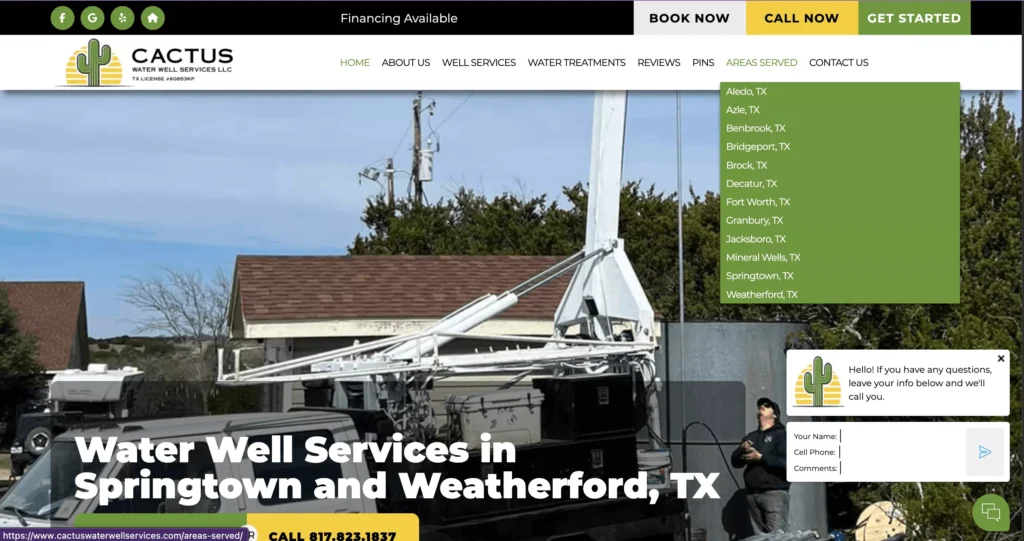
Cactus Water Well Services LLC‘s website appropriately chooses a single-website solution for their multi-location service as all of their service areas exist within the same North Texas region.
The website does an excellent job of differantating city pages with unique, city-specific content, such as jobsite photos and descriptions of work performed in the corresponding area.
Shoreline Snuba
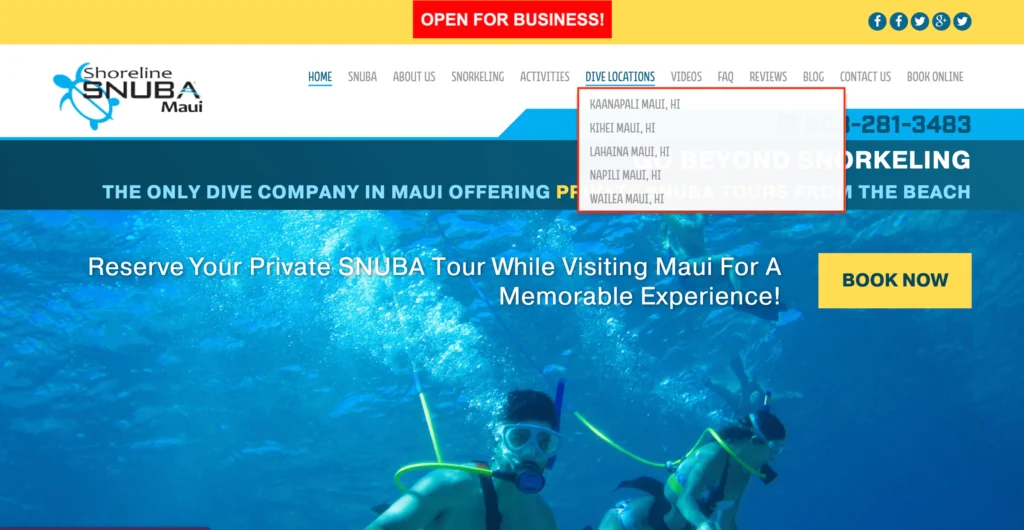
Shoreline Snuba’s website links to its individual dive locations directly from the main menu, in the header, letting visitors navigate straight to the location closest to their trip and book a private snorkeling tour without hunting through the site.
These indiviudal pages also pull up in search engines and AI responses for users asking about specific locations.
Majestic Outdoor Lighting
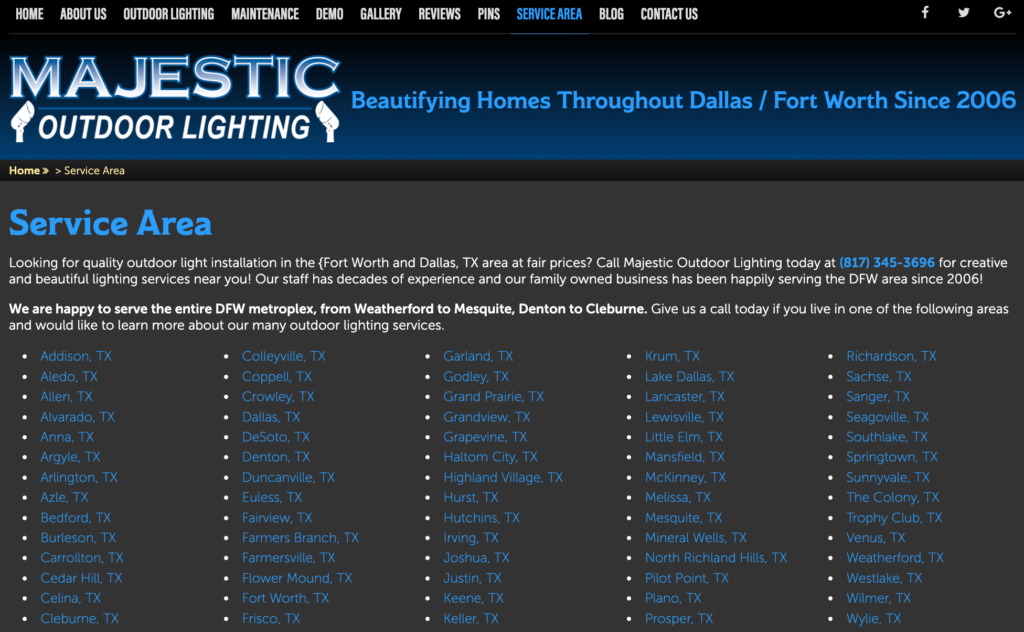
Majestic Outdoor Lighting runs dozens of unique location pages under one domain, covering cities across the Dallas-Fort Worth metro area. Some of those cities have a verified Google Business Profile and office address behind them while others don’t.
The business also targets several cities where it holds no office address at all, operating there strictly as a service-area business, which shows that a single domain with strong city pages can support both office-based and service-area coverage side by side.
When Multi-Location Strategies Break Down
Multi-location structures fail in a few predictable ways.
Splitting into separate websites when locations overlap is one. If two locations share the same effective service area, as with the Dallas, Plano, and McKinney example above, dividing them across separate domains fragments the authority each one could otherwise share, without adding any real benefit to users searching in that area.
Duplicate or thin city-page content is another, and the more common one. As covered above, Google’s spam policies specifically flag pages built around swapping a city name into otherwise identical content, and treat clusters of these pages as a pattern search algorithms are built to detect and demote.
Orphan pages are a related but distinct problem. A location page with no internal links pointing to it, whether missing from the main menu or dropped from any other part of the site, is harder for both users and search engines to find. That isolation is itself a signal search engines associate with low-value pages, independent of the content quality on the page itself.
Multi-Location SEO for Solo Operators, Budget-Limited Contractors, and Service-Area Businesses
The practices above assume a business with the resources to build and maintain multiple fully developed pages or sites. That assumption doesn’t hold for every multi-location business.
A solo operator or two-location startup does not need to resolve the separate-websites-versus-unified-domain decision the same way a five-location regional company would. In most of these cases, a single domain with two or three well-built city pages is enough: there’s rarely a scale or overlap argument for splitting into separate sites before a business has the content resources to properly maintain more than one property.
Budget-limited contractors face a similar tradeoff on a smaller scale. A thin location page is worse than no location page at all, since it risks the duplicate-content patterns covered above. Prioritizing one or two genuinely complete city pages over five thin ones is generally the stronger use of limited content resources.
Service-area businesses with no physical office, like the Majestic Outdoor Lighting example, work under a different rule set entirely. With no verified address to anchor a location page, the page has to justify its existence through content: named neighborhoods served, project photos from that area, and service specifics, rather than office details it doesn’t have.
Google’s service-area guidelines already require hiding the business address on the Business Profile for these businesses, so the website’s city pages become the primary place that local relevance gets established.
Other Considerations for Multi-Location Websites
Structured Data Markup
Adding LocalBusiness schema to your homepage and location pages helps search engines understand the geographic specifics of each page and makes pages eligible for rich snippets in local search results.
Social and Brand Signals
Brand legitimacy signals extend beyond your own website. As of 2026, review recency carries more weight than total review count for multi-location brands specifically: BrightLocal’s Local Consumer Review Survey 2026 found that review freshness, not volume, increasingly drives consumer trust decisions, which means each location needs its own steady stream of recent activity rather than one large historical batch. Beyond reviews, this includes:
- Social media traffic that reaches your site from platforms like Facebook, Instagram, and YouTube
- Directory listings and business profiles across relevant platforms
- Paid ad presence and email engagement tied to a specific location
Local Content Updates
Secondary or lower-traffic city pages are the ones most likely to get neglected over time. Since low-quality content on any part of a site can degrade site-wide signals, budgeting ongoing content resources (regular page updates, current NAP information, fresh project photos) for every location, not just the primary one, protects rankings across the whole site.
Location Performance Tracking
Google Analytics 4 and Google Search Console make it straightforward to track performance by city page. A Seattle page pulling 90 visits against a Spokane page’s 30 gives you a baseline for comparison, keeping in mind that population size and page authority both influence that gap. Underperforming pages are worth auditing against competitor content in that specific market.
URL Optimization
Each location page needs a unique, consistent URL structure that includes the city name. A remodeling contractor with locations in Miami and Key West should use a clean format like “/key-west” rather than “/contractor-key-west,” making the URL pattern predictable across every location page on the site.
SEO Supplementation with Paid Ads
When a location hasn’t yet built enough organic authority to rank, Google Search Ads (for landing pages, on a pay-per-click model) or Local Services Ads (for Google Business Profiles, on a pay-per-lead model) can supplement traffic in the short term.
Paid advertising works best as a short-term supplement rather than a long-term substitute for organic local SEO, since ad spend stops producing visibility the moment the budget does.
Final Thoughts on Multi-Location Web Design
The distance-and-overlap decision is the foundation of successful multi-location web design. If you use separate websites for genuinely distinct markets and a single domain with unique city pages for overlapping ones, you’re setting a solid foundation.
Beyond that, your goal is to make each location page genuinely unique rather than simply swapping out city names, and connect each page to its Google Business Profile with consistent NAP data.
Further considerations for multi-location campaigns, such as citations, structured data, and analytics, produce superior results when you’ve established this credible foundation.